In this guide
Nine days before a big wedding, the planner has the guest list in one spreadsheet, the seating in a photo of a whiteboard, vendor quotes in WhatsApp threads and the payment schedule in a notebook. Every call from the family means opening four places to answer one question. This guide covers event planning software for wedding planners: how the work actually flows, which numbers to connect and what to look for before you adopt or commission a tool.
Where does event planning break down?
Event work is a pile of small dependencies. A change in one place quietly breaks another.
- Guest counts that drift. RSVPs change daily, but the caterer's headcount was fixed a week ago.
- Seating built in isolation. A table is over capacity, or two families who should not sit together share one.
- Vendor quotes scattered across chats. Nobody can say which quote was accepted or whether it is inside the budget.
- Venue clashes. The same hall is pencilled for two events on one weekend.
- Payment milestones missed. A deposit is late and a vendor stops responding.
- A run-of-show that lives in one head. On the day, the planner is the only person who knows what happens at what time.
- Clients who cannot see progress. They phone for updates, and every update costs the planner time.
What is the planner's real workflow?
Whatever tools you use, an event moves through the same stages, from first enquiry to the final settlement.
1. Enquiry and pipeline
Each enquiry becomes a card in a pipeline: enquiry, proposal, confirmed, planning, executed, settled. The pipeline shows how many events are at each stage and where value is stuck. Creating an event from a standard package, with its default tasks and budget lines, saves retyping the same structure.
2. Guests and RSVPs
A guest list is more than names. It tracks household, side of family, invitation status, response, meal choice and special needs. The useful views are a funnel (invited, responded, confirmed), a meal split and a way to send invitations in batches.
3. Seating
A seating chart turns the confirmed list into tables with capacity checks. Tapping or dragging a guest to a table and seeing an immediate over-capacity warning prevents errors that otherwise surface at the venue.
4. Vendors, quotes and contracts
You keep a directory of caterers, decorators, photographers and musicians with their availability, request quotes and compare them. When a quote is accepted, it should feed the budget automatically, so there is one source of truth.
5. Budget and payments
Planned versus actual by category, with milestones for each payment and a warning on overspend.
6. Run-of-show
The timed sequence for the day, with owners for each item, which can be reordered and ticked off live.
Worked example: how one number moves everything
All figures here are made up for illustration.
A planner has a planned budget of ₹10,00,000 for a wedding.
| Category | Planned (sample) | Actual (sample) | Difference |
|---|---|---|---|
| Catering | ₹4,00,000 | ₹4,40,000 | +₹40,000 |
| Venue | ₹3,00,000 | ₹3,00,000 | 0 |
| Decor | ₹1,50,000 | ₹1,50,000 | 0 |
| Photography | ₹80,000 | ₹80,000 | 0 |
| Music | ₹70,000 | ₹70,000 | 0 |
| Total | ₹10,00,000 | ₹10,40,000 | +₹40,000 |
Why did catering rise? The catering quote assumed 200 guests at ₹2,000 a plate, which is ₹4,00,000. RSVPs came in at 220, and 220 times ₹2,000 is ₹4,40,000. One guest-count change produced a 10% overspend on a category and a 4% overspend on the whole budget. If guest count, catering and budget live in separate files, you learn this at the final invoice. If they are linked, the overspend warning appears the day the 201st RSVP lands.
Seating shows the same chain. For 300 confirmed guests at tables of 10 you need 30 tables. If the hall layout seats 8 per table, you need 37.5, so 38 tables, and the floor plan must be redrawn. Payment milestones follow the same logic: a 30%, 40%, 30% split of ₹4,00,000 is ₹1,20,000, ₹1,60,000 and ₹1,20,000, which sums to the full amount.
Tip
Freeze one cut-off date for the final headcount and put it on the vendor's payment schedule. Software cannot set that date, but it can remind everyone of it and show who still has not responded.
How do you set up an event-planning workflow, step by step?
- Define your standard packages. List the services, default tasks and budget lines of each package you sell.
- Build the pipeline. Agree stage names, and who moves a card to the next stage.
- Collect guests once. Import the list from the family, with household and side, and track responses in one place.
- Run an availability check before you promise a date. Check both venue and key vendors.
- Request and compare quotes in the system. Accept one and let it update the budget.
- Schedule milestones for each payment, with a warning before the due date.
- Draft the run-of-show a week out, assign owners and share it with vendors.
- Give the client a simple view. Progress, upcoming payments and tasks awaiting their input.
- Review after the event. Compare planned and actual, note vendor performance and ask for a review.
Spreadsheet, messaging apps or purpose-built software?
| Need | Spreadsheet | Messaging threads and notebook | Purpose-built planning software |
|---|---|---|---|
| Guest count to catering to budget | Separate tabs, manual links | Retyped each time | Connected numbers |
| Seating with capacity checks | Drawn by hand | Photo of a sketch | Visual hall with warnings |
| Venue clash detection | Calendar eyeballing | Memory | Calendar that flags clashes |
| Quote comparison and acceptance | Pasted figures | Scrolling back through chats | Quotes tied to budget |
| Run-of-show on the day | Printed sheet | Voice notes | Ordered list with owners and live marker |
| Client visibility | Emailed copies | Phone calls | Client portal view |
For small planners with a few events a year, a spreadsheet can be enough. The tipping point is usually overlapping events, or a family that wants frequent updates. Many planners also run enquiries through chat, so our guide to a WhatsApp CRM for small business sales teams may help with lead follow-up.
What to ask any event-planning software vendor
- Do guest counts, catering quotes and the budget connect, or do I retype them?
- Does seating warn me when a table is over capacity, and can I rearrange on a phone or tablet as well as a desktop?
- Does it flag venue and vendor clashes before I confirm a date?
- When a quote is accepted, does the budget update on its own?
- Can I set payment milestones and see overdue ones at a glance?
- Can I reorder a run-of-show and tick items off on the day?
- Can I show clients a simple portal view without exposing my margins?
- Can invitations be drafted in the languages my families use?
- How do invoices handle the tax rules I follow? Check the current rules with your accountant.
- If I leave, can I export my guests, vendors and budgets?
Mistakes planners make with their tools
- Setting the headcount too early. Vendors need a number, but the number needs a cut-off date and a buffer policy agreed with the client.
- Keeping vendor availability in your head. It fails the first time two events share a weekend.
- Treating quotes as chat messages. Without a record of what was accepted, disputes follow.
- Building a run-of-show only the planner understands. Give each item an owner and a start time.
- Ignoring profitability. Revenue looks healthy, but without actual costs per event you do not know which package earns you most. A related read for venue operators is our guide to hotel and homestay software.
What the EventOcta demo shows
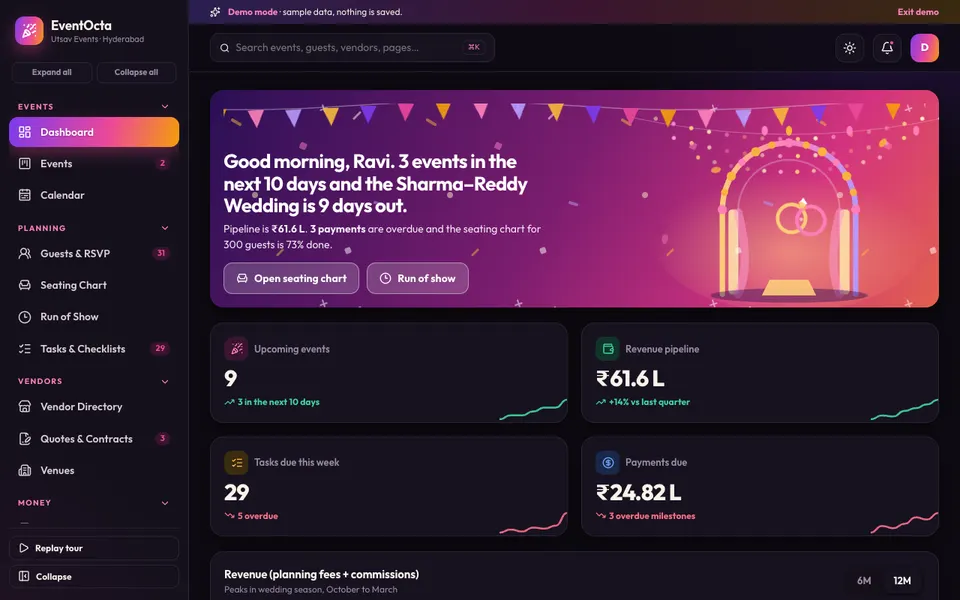
The EventOcta demo is an interactive example of the workflow above, set at a fictional Hyderabad event company. It runs in the browser on desktop, tablet and phone layouts. Everything in it is sample data, nothing you do is saved, the data resets when you refresh, and the Studio tools that look like AI are simulated and scripted.
- Dashboard, Events and Calendar: a pipeline you can drag from enquiry to settled, event creation from a package and a calendar that shows venue clashes.
- Guests and RSVP: a response funnel, a meal split and an invitation batch.
- Seating chart: an SVG hall where you drag or tap guests onto tables, with a capacity check, auto-seat and renameable tables.
- Run of show: drag to reorder, tick items off and a live-now marker driven by a simulated clock.
- Tasks and checklists: the working list for each event.
- Vendor directory, quotes and contracts, venues: 40 vendors with availability and quote requests, and acceptance that updates the budget, plus signing.
- Budget, payments and invoices: planned versus actual, overspend warnings, milestones and GST-style invoices. If you also need to understand invoice basics, see how to make a GST invoice.
- Clients and reviews: a client list with a phone-sized client-portal preview, and reviews.
- Analytics: overview, pipeline, vendors and profitability views.
- Event Studio (simulated): scripted tools for a budget optimiser, vendor matcher, smart seating planner, an invitation and message writer in English, Hindi and Telugu with three tones and a WhatsApp preview, a moodboard generator, a run-of-show generator and an RSVP forecaster. These produce pre-written, deterministic results, not output from a real model.
A few honest limits: drag and drop does not fire on touch screens, so on a phone you tap a guest and then a table. Guest lists and seating exist only for two sample events, a 300-guest wedding and an engagement. The pipeline and run-of-show reordering are mouse-drag only.
How do you try it?
- Open the demo and choose Try Demo Account on the login screen.
- Open Seating Chart for the 300-guest wedding, drag a guest to a full table and read the warning.
- Open Quotes and Contracts, accept a quote and check how Budget changes.
- Open Run of Show, reorder two items and watch the live marker.
- Open Event Studio and try the invitation writer, remembering it is scripted. The wider range of examples is in all Zenocta demo apps.
Getting event-planning software built for your company
A real build starts with your packages, your vendor network, your payment schedules and the way your clients like to be updated. Real delivery of invitations, saved data and client logins are the pieces a demo leaves out. Zenocta scopes that work as a fixed-price proposal. You can see the apps we already ship in production on the Zenocta apps page, and you can talk to us about your events whenever you are ready.
Try it live
Open the real thing: demos run in a new tab with sample data, apps link to their own page.
 Live demoEventOcta live demoDrag the event pipeline, seat 300 guests, accept a quote, reorder the run-of-show and try the scripted Studio tools.
- ABrowse allAll demo appsBrowse every interactive industry demo from Zenocta.
- ZBrowse allZenocta appsProduction apps live on Google Play.
- TBrowse allTalk about a custom buildDescribe your events and get a scoped, fixed-price proposal.
Frequently asked questions
01What should event planning software for wedding planners include?
At minimum: an event pipeline, a guest list with RSVPs, a seating chart with capacity checks, a vendor directory with quotes, budget and payment milestones, a run-of-show and a simple client view. The value comes from these being connected.
02How do I plan seating for a large wedding?
Work from confirmed guests, group households, then assign them to tables with a live capacity check. As a sample calculation, 300 guests at 10 per table need 30 tables, but at 8 per table they need 38.
03Are the Event Studio tools in the EventOcta demo real AI?
No. They are simulated and scripted. The budget optimiser, vendor matcher, invitation writer and RSVP forecaster return deterministic, pre-written results. The demo also uses sample data, saves nothing and resets on refresh.
04Does the demo work on a phone?
Yes, the layout adapts to phones and tablets. Drag and drop does not fire on touch screens, so on a phone you tap a guest chip and then a table to seat them. Pipeline and run-of-show reordering are mouse-drag only.
05Can Zenocta build event planning software for my company?
Yes. Zenocta scopes custom builds as a fixed-price proposal after hearing about your packages, vendors, payment schedules and client communication. Saved data, real invitation delivery and client logins can be part of a scoped build.