In this guide
A buyer calls about a two-bedroom unit, the salesperson says it is available, and a colleague tells another buyer the same thing that afternoon. By the time the booking cheque arrives, one of them is disappointed. This guide explains how a real estate CRM for builders and brokers prevents that, and the other quiet losses between the first enquiry and the last instalment.
Where does property sales work break down?
Property sales are slow, high value and people-heavy, which makes them hard to run on memory. Most teams use a spreadsheet for inventory, a notebook or chat groups for leads, and a separate file for payments. The cracks appear in predictable places.
- Slow first response. An enquiry from a portal or a hoarding call sits for hours, and the buyer contacts three other agents meanwhile.
- Invisible follow-ups. Whether a lead was called last week depends on which salesperson you ask.
- Double-sold units. The inventory sheet is updated after the booking, not at the moment of the promise.
- Site visits that vanish. A buyer says they will come on Saturday, the cab is not arranged, and the visit never happens.
- Collections chased late. Milestones are tracked in a separate sheet, so overdue amounts are found at month end.
A CRM is a single place where the lead, the unit and the money all point at each other.
What is the difference between a CRM and an inventory sheet?
An inventory sheet answers one question: what is for sale. A CRM answers several at once: who is interested in what, what has been said, what happens next and what is owed. The value comes from the links. When a lead is attached to a unit, a visit is attached to the lead, and a booking is attached to the unit, you can follow one buyer from the first call to the last payment without opening five files.
Builders and brokers need different views
A builder cares about projects, towers, floors and units, and about construction-linked collections. A broker cares about listings across several developers, buyer preferences and commissions. Good software lets both work from the same structure of leads, visits and deals, while showing different inventory: a tower grid for the builder, listing cards or a map for the broker.
How should lead tracking work for property?
Leads arrive from portals, social ads, walk-ins, referrals and channel partners. Each needs a source, an owner and a stage. A kanban board with columns such as new, contacted, site visit, negotiation and booked gives the sales head a live picture of where buyers are stuck.
Two habits matter more than any feature. First, respond fast and log it: a lead with no recorded contact in the first day should stand out. Second, keep notes short and factual: budget, preferred size, timeline, family decision-makers. A good record means a colleague can pick up the conversation if the owner is on leave.
Tip
Mark the hot leads separately from the full pipeline. A short list of buyers who have visited, asked for a cost sheet or discussed a payment plan is where the sales head should spend the morning review.
Site visits: the step where most deals are won or lost
A site visit is the first time a buyer sees the real thing, so it should be planned like an event. A week calendar showing each visit, who is hosting, which unit is being shown and which buyer is coming makes the day predictable. Reminders the day before, and a record of the outcome afterwards, turn visits into data: how many visits become negotiations, and which salesperson converts best.
When several visits fall on the same day, a route or order of visits saves hours. Even a simple list sorted by locality helps a team that is driving between projects.
Inventory, cost sheets and payment plans
For a builder, the tower grid is the heart of the system. Each cell is a unit with a size, a floor, facing and a status such as available, blocked or booked. Clicking a unit should open a booking panel with a cost sheet and a payment plan generated from that unit's data.
A cost sheet normally lists the base price, any floor-based or view-based premium, parking, and statutory charges and taxes that change over time. Do not hard-code the statutory parts: check the current rules and make them editable. A payment plan then spreads the total across milestones.
Here is an illustration with invented figures for one unit priced at ₹80,00,000 on a construction-linked plan:
| Milestone | Share | Amount (₹) |
|---|---|---|
| On booking | 10% | 8,00,000 |
| Foundation complete | 20% | 16,00,000 |
| Slab complete | 30% | 24,00,000 |
| Finishing stage | 30% | 24,00,000 |
| On possession | 10% | 8,00,000 |
| Total | 100% | 80,00,000 |
When both the cost sheet and the schedule come from the same unit record, the buyer, the salesperson and the accounts team all see the same figures. If you are also managing construction costs behind these collections, our guide on tracking construction expenses across partners covers the other side of the ledger.
Deals, pipeline value and collections
A deal pipeline shows each negotiation by stage and value. The trap is adding every deal at full value and calling it the forecast. A weighted pipeline multiplies each deal by a probability that matches its stage.
| Deal (made-up) | Value (₹) | Stage weight | Weighted (₹) |
|---|---|---|---|
| Deal A | 1,20,00,000 | 25% | 30,00,000 |
| Deal B | 85,00,000 | 50% | 42,50,000 |
| Deal C | 60,00,000 | 80% | 48,00,000 |
| Total | 2,65,00,000 | 1,20,50,000 |
Raw pipeline is ₹2,65,00,000, but the weighted view is ₹1,20,50,000, a figure a sales head can plan around. The stage weights are your own judgement, so review them against real conversions every quarter.
After booking, the work becomes collections: milestone dates, amounts due in the next fortnight, overdue amounts and the demand letter sent for each. This list should be on one screen, checked daily.
A step-by-step rollout for a sales team
- Load projects and units. Start with one project, with sizes, floors and current status, and make sure it matches reality.
- Import current leads. Give each an owner, a source and a stage. Delete or archive dead leads rather than carrying them.
- Move site visit scheduling in. Ask the team to book every visit in the calendar for two weeks.
- Use the booking panel for every new booking. It forces the cost sheet and plan to come from one record.
- Bring in collections. Enter payment schedules for open bookings and set a daily check.
- Review weekly. Pipeline by stage, visits done, collections overdue. Adjust stage names to match how your team talks.
What to ask any real estate CRM vendor
- Can I see a tower or layout grid with live unit status?
- Does a booking generate a cost sheet and payment plan from the unit record?
- Can leads come in from my website and portals, and be assigned automatically?
- Is there a site visit calendar with reminders and outcomes?
- Can I track milestone collections, overdue amounts and demand letters?
- Are statutory charges editable, so I can follow the current rules?
- Can channel partners and agents be tracked with their leads and commissions?
- Can I export my data, and who can see which projects?
Spreadsheet, chat groups or purpose-built CRM?
| Need | Spreadsheet | Chat groups | Purpose-built CRM |
|---|---|---|---|
| Unit status | Updated after the fact | Scattered | Live grid |
| Lead follow-up | Manual | Lost in scroll | Stage, owner and next step |
| Site visits | Separate sheet | Informal | Calendar with outcomes |
| Cost sheet and plan | Hand calculation | Photos of paper | Generated from the unit |
| Collections | Month-end review | Memory | Due and overdue lists |
Sheets work for a small project with a few buyers. They stop working when several people update them at once. For a broader argument on when to move to proper software, read why every MSME should invest in custom software.
What the EstateOcta demo shows
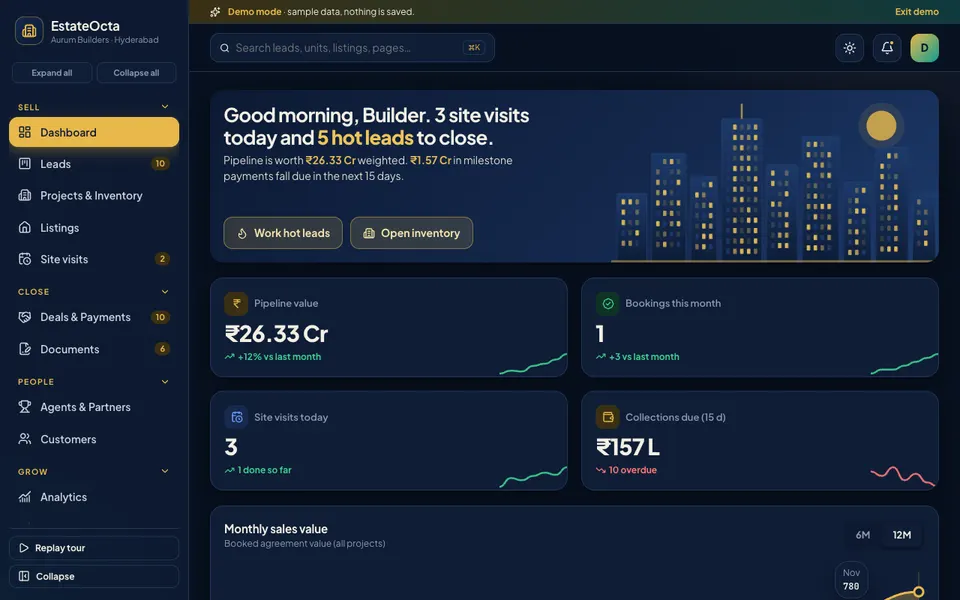
EstateOcta is an interactive demo of a real estate CRM for a sample Hyderabad-style builder. All data is synthetic, nothing is saved, data resets on refresh, and the Deal Studio tools are scripted simulations, not real AI. Cost figures, taxes and valuations are illustrative, and WhatsApp, e-sign, payments and PDFs are simulated with messages only.
- Dashboard. Pipeline value, bookings, site visits today and collections due in one view.
- Leads. A drag-and-drop kanban board, so you can feel how a team moves buyers between stages.
- Projects and Inventory. A tower grid with a booking drawer holding a cost sheet and payment plan.
- Listings. Property cards or a stylised locality map, useful for brokers.
- Site visits. A week calendar of visits.
- Deals and Payments. A deal pipeline, milestone schedules, collections due and demand letters.
- Documents. E-sign tracking and a RERA checklist. Check the current rules for any real project.
- Agents and Partners, and Customers. Channel partners, plus customer records with EMI and loan eligibility views.
- Analytics and Campaigns. Overview, Sales, Marketing and Team tabs, plus campaign tracking.
- Deal Studio. Seven scripted tools: lead scoring, a property matcher, a price estimator, a listing writer, a call summariser, a visit route planner and a document checker. All simulated.
The demo also includes a command palette, notifications and a simulated website enquiry that arrives every so often, to show how a live lead appears.
How to try the demo
Open the demo and press Try Demo Account on the login screen for a guided tour. Then drag a lead between stages, open a unit in the inventory grid to see the cost sheet, and check the collections list under Deals and Payments. When you are done, browse the other builds on our demo apps page.
Getting a CRM built around your projects
Every builder and broker sells differently: some work through channel partners, some through direct sales teams, some through portals. A custom build can match your stages, your payment plans and your reports. Zenocta builds custom business software, starting with how your leads, units, visits and collections really run, and ending with a scoped, fixed-price proposal. If that suits you, start a conversation with us, and see the apps we have already published. If you are also planning a home or a layout, our guide on choosing a house plan before you build may help your buyers too.
Try it live
Open the real thing: demos run in a new tab with sample data, apps link to their own page.
 Live demoEstateOcta live demoOpen a sample builder: tower inventory grid, lead kanban, site visit calendar, deals, payments and documents.
- ABrowse allAll demo appsBrowse every interactive demo, each with a sample company and nothing saved.
- ZBrowse allZenocta appsProduction apps live on Google Play.
- TBrowse allTalk about a custom buildTell us how your sales and collections run and get a scoped, fixed-price proposal.
Frequently asked questions
01What is a real estate CRM?
It is software that tracks buyers and property: leads and their follow-ups, project and unit inventory, site visits, bookings, payment schedules and documents. It replaces the mix of spreadsheets, call notes and chat messages that most sales teams use.
02Why do builders need live inventory in a CRM?
Because units are limited and each is sold once. A live grid shows what is available, held or booked, so two salespeople do not promise the same unit, and buyers are shown only what can actually be sold.
03How can a CRM help with payment collections?
It stores each buyer's payment plan with milestone dates and amounts, so the accounts team can see what is due, what is overdue and who needs a reminder or a demand letter, instead of building that list by hand each week.
04Is EstateOcta a real property product?
No. EstateOcta is an interactive demo with a sample builder and synthetic data. Nothing is saved, data resets on refresh, and its Deal Studio tools are simulated. Costs, taxes and valuations shown are illustrative.
05Can Zenocta build a real estate CRM for my business?
Yes. Zenocta builds custom business software. We start with how your leads, units, visits and collections work today, then provide a scoped, fixed-price proposal for the modules your team needs.