In this guide
A salesman writes an order in a notebook, the office copies it into the billing system the next morning, and the retailer who already owes a large amount gets another delivery because nobody checked. A distributor lives on small margins, so one unchecked credit order can wipe out the profit of many good ones. This guide explains how distributor software fixes the chain from order to collection.
Where does a distributor lose margin?
A distributor sits between brands and retailers, handling hundreds of small accounts. The margin per case is thin, so leaks matter. Most of them come from the gaps between people.
- Orders copied twice. A handwritten order is retyped, and quantities or prices go wrong in between.
- Credit decided by memory. The salesman promises the delivery, and the office finds out the retailer is over limit after the vehicle has left.
- Schemes applied by hand. Free goods and discounts are calculated differently by different people.
- Outstanding that nobody ranks. The total is known, but not which retailers are late or which route is slow.
- Stock surprises. The warehouse learns about a stock-out when a retailer is already waiting.
Software helps by putting each of these checks at the moment of the decision, not after it.
How should salesman order taking work?
The salesman visits a retailer on a beat, a fixed route covered on a regular day. On a phone, the order screen should show the retailer's name, the price list that applies and the products. Entering quantities should update the total, apply schemes and show the credit position in one go.
Suggested orders
Retailers tend to reorder the same items. A screen that suggests the usual items, with the last quantity, saves time and lifts the order size, because the salesman reminds the retailer of products that may have run low. The suggestions should be easy to change: they are a prompt, not a decision.
Credit check at the point of sale
Before the order is confirmed, the system should compare the order value plus current outstanding with the retailer's credit limit. Here is an illustration with made-up numbers:
| Item | Amount (₹) |
|---|---|
| Retailer credit limit | 1,00,000 |
| Current outstanding | 90,000 |
| New order | 18,000 |
| Outstanding after order | 1,08,000 |
| Over the limit by | 8,000 |
The system should not simply block the order. It should place it on credit hold and route it to a manager, who may approve it, ask for a part payment or reject it. That keeps the salesman informed and the decision with the right person.
What is a trade scheme and what does it really cost?
A scheme is an offer to retailers: buy a quantity and get free goods, or a discount, or a value-linked reward. Schemes drive volume, but each one has a cost that is easy to miss. Take a "buy 10 cases, get 1 free" offer, with invented numbers.
- List price: ₹1,200 per case. Your cost: ₹1,000 per case. Margin: ₹200 per case.
- Without the scheme, a retailer buying 10 cases pays ₹12,000. Your cost is ₹10,000 and your margin is ₹2,000.
- With the scheme, the same retailer pays ₹12,000 for 11 cases. Your cost is ₹11,000 and your margin is ₹1,000.
So the free case costs ₹1,000 in margin on every such order, half of what you would have earned. That is only worth it if the scheme brings extra orders, or if the brand reimburses the free case through a claim. A good scheme tool shows an estimated uplift, cost and return before you switch the scheme on, and the order screen applies it automatically so nobody has to calculate it at the counter. The uplift figure is always an estimate, so compare it with real results after the scheme ends.
Tip
Write down, before launching any scheme, how much extra volume you need to break even. Then check actual orders against that number at the end. Schemes that are never reviewed tend to run forever.
Outstanding and collections: read the ageing, not the total
The total outstanding figure hides risk. Grouping dues by age shows where trouble is building. Here is one retailer's ledger, with invented figures.
| Age of invoice | Amount (₹) |
|---|---|
| 0 to 15 days | 40,000 |
| 16 to 30 days | 25,000 |
| 31 to 45 days | 15,000 |
| Over 45 days | 10,000 |
| Total | 90,000 |
Of the ₹90,000, the part older than 30 days is ₹25,000, about 27.8%. Showing this by salesman or by route tells you whether the problem is one retailer, one route or one salesman's follow-up. A priority list ranks retailers by what is owed and how old it is, and recording a collection should update the ledger and the credit position immediately, so a retailer who pays can be released from hold.
Beats, vans and deliveries
A beat plan decides which retailers each salesman visits on which day. A map and a route list help, and marking visits, whether or not an order was taken, builds a log that shows coverage. On the delivery side, a trip planner groups invoices into vehicle loads, a load-out sheet tells the warehouse what to put on the van, and proof of delivery closes the loop. If you want to see how stock operations connect to this, read our guide to warehouse management for small warehouses.
Stock, batches and purchases
Distributors of packaged goods need batch and expiry tracking, goods receipt against purchase orders, and a way to record adjustments for damage or shortage. Purchases also include claims against brands for schemes and damaged goods, which are easy to forget and are real money. For the stock-keeping basics, our post on billing and inventory for small retailers covers the ideas from the other side of the counter.
A rollout plan for a distributor
- Clean the retailer master. One record per retailer, with beat, price list, credit limit and phone number.
- Load products and price lists. Include pack sizes and batch rules.
- Start with order taking on two beats. Let two salesmen use the phone screen for two weeks.
- Turn on the credit check. Decide who approves holds, and how quickly.
- Add schemes next. Enter active schemes so orders apply them automatically.
- Move collections and ageing in. Record every receipt in the system, and review ageing weekly.
- Bring in the warehouse and delivery trips. By then, orders are clean enough to plan loads from.
What to ask any distributor software vendor
- Can a salesman take an order on a phone, with price list, schemes and credit shown before confirming?
- Does the credit check hold an order and send it for approval?
- Can I build a scheme and see its estimated cost before launching it?
- Can I see outstanding by age, by salesman and by route?
- Does it support batch and expiry, goods receipts and purchase claims?
- Can invoices follow the current tax and e-invoicing rules? Check the current rules for your case, and see our guide to GST billing software.
- Is there a trip planner and proof of delivery?
- Can I export my data, and who can see which figures?
Common mistakes
- Letting everyone override credit. If any salesman can bypass the hold, it is not a control.
- Launching schemes without a break-even. You cannot judge success without the target.
- Using one price list for every retailer. Different outlet types usually need different lists.
- Recording collections late. A ledger that lags makes the credit check wrong.
- Moving everything on day one. Start with orders and credit, then widen.
Notebook, spreadsheet or purpose-built software?
| Need | Notebook | Spreadsheet | Purpose-built software |
|---|---|---|---|
| Order entry | Copied by the office | Typed by the office | Taken on the phone |
| Credit check | Memory | Manual lookup | Automatic hold and approval |
| Schemes | Mental arithmetic | Formulas per scheme | Applied at order time |
| Outstanding by age | Not possible | Heavy to maintain | Age bands by route and salesman |
| Delivery trips | Verbal | Manual sheet | Trip planner and load-out |
What the DealerOcta demo shows
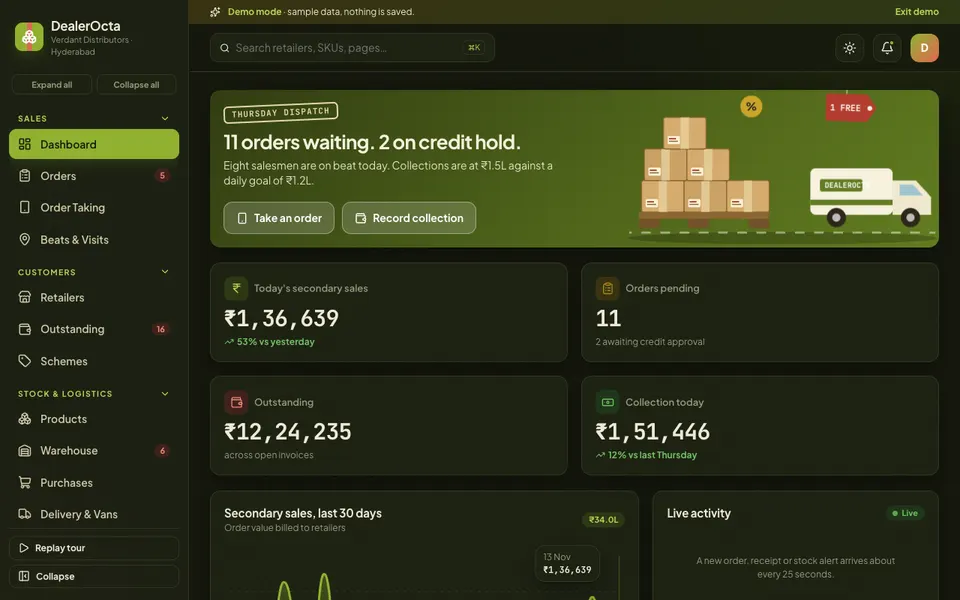
DealerOcta is an interactive demo of a distributor, wholesaler and van-sales system for a fictional Hyderabad distributor. All data is synthetic, nothing is saved and data resets on refresh. Brands, tax numbers and invoice references are fictional, tax slabs and the ROI model are illustrative, and the Dealer Studio tools are scripted simulations, not real AI.
- Dashboard. Orders waiting, credit holds, today's sales and collections, and live activity.
- Orders. A drag-and-drop pipeline, credit-hold approval and conversion to an invoice with a mock reference number.
- Order Taking. A salesman phone screen and a desk form, with automatic schemes, suggested order chips and a credit check.
- Beats and Visits. A beat map, a route and a visit log.
- Retailers, Outstanding and Schemes. A profile drawer with ledger and credit, ageing bars by salesman or route with a priority list and a record-collection action, and a scheme builder with a live preview, estimated uplift, cost and ROI.
- Products, Warehouse and Purchases. Price lists, batch and expiry, goods receipts, adjustments, purchase orders and claims.
- Delivery and Vans. A trip planner, load-out sheet and proof of delivery.
- Salesmen and Analytics. Targets, attendance, productivity and incentive, plus four analytics tabs.
- Dealer Studio. Seven simulated tools: smart order suggestion, a credit-risk and collection prioritiser, a beat and route optimiser, a scheme effectiveness simulator, a stock-out and demand forecast, a salesman coach and invoice and claim OCR.
How to try the demo
Open the demo and press Try Demo Account on the login screen for a guided tour. Then take an order in Order Taking and watch the scheme and credit check respond, open Outstanding to see ageing by salesman, and build a scheme to see the cost preview. On touch devices, use the arrow button on order cards instead of drag and drop. More builds are on our demo apps page.
Getting distributor software built around your business
Every distributor works with different brands, schemes, credit terms and delivery patterns. A custom build can match your price lists, your approval rules and your reports. Zenocta builds custom business software, starting with how your salesmen, credit, schemes and deliveries run, and ending with a scoped, fixed-price proposal. If that sounds useful, talk to us, or look at the apps we already publish.
Try it live
Open the real thing: demos run in a new tab with sample data, apps link to their own page.
 Live demoDealerOcta live demoOpen a sample distributor: order taking, schemes, outstanding ageing, beats, warehouse and van trips.
- ABrowse allAll demo appsBrowse every interactive demo, each with a sample company and nothing saved.
- ZBrowse allZenocta appsProduction apps live on Google Play.
- TBrowse allTalk about a custom buildTell us how your distribution runs and get a scoped, fixed-price proposal.
Frequently asked questions
01What is distributor management software?
It manages the flow between a distributor and its retailers: salesman order taking, trade schemes, credit limits, invoices and delivery, collections and outstanding, warehouse stock and purchases, plus targets and incentives for the sales team.
02How does a salesman order-taking app help a distributor?
It lets a salesman enter an order at the retailer's shop, apply the correct price list and scheme automatically, and see the retailer's credit position before confirming. The order reaches the office immediately instead of being copied from paper.
03Why track outstanding by age?
Old dues are harder to collect and more likely to turn bad. Grouping outstanding into age bands shows which retailers and routes need attention first, and helps you decide who should be on credit hold.
04Is DealerOcta a real distributor product?
No. DealerOcta is an interactive demo with a fictional distributor and synthetic data. Nothing is saved, data resets on refresh, and its Dealer Studio tools are simulated. Tax values, invoice numbers and the ROI model are illustrative.
05Can Zenocta build distributor software for my business?
Yes. Zenocta builds custom business software. We start with how your salesmen, schemes, credit and deliveries work today, then provide a scoped, fixed-price proposal for the modules you need.