In this guide
In a mid-size company, buying is rarely one person's job. A site engineer raises a need, a manager approves it, a buyer collects quotes, someone issues an order, the store receives goods and accounts pays an invoice. Each handover is a place where price, quantity or accountability can slip. Procurement software links those steps so you can see what was asked, what was agreed, what arrived and what you were billed for.
Why does buying go wrong in growing companies?
The typical process runs on email, phone calls and Excel. A requisition arrives as a message. The buyer asks three vendors for rates on WhatsApp, pastes the replies into a sheet and picks the lowest. A purchase order is typed in a template. Goods arrive, the store keeper signs the vendor's challan, and weeks later an invoice turns up in accounts, where somebody tries to remember what was ordered.
The costs show up quietly:
- Headline price wins, landed cost loses. The cheapest per-unit quote often carries higher freight or longer delivery, and the sheet only compares the unit rate.
- Approvals are informal. A verbal "go ahead" from a manager is not a record, and limits are applied inconsistently.
- Invoices are paid without checking receipt. Accounts pays what the vendor billed, not what was ordered and received.
- Vendors are judged by memory. The vendor who is always late has no score, so they win the next order too.
What does the purchase-to-pay chain actually look like?
Whatever software you use, the chain is the same. Each document answers one question, and each one should link to the one before it.
| Document | Created by | The question it answers |
|---|---|---|
| Requisition | The person who needs something | What is needed, how much, by when, for which budget? |
| RFQ (request for quotation) | Buyer | Which vendors were asked, and on what specification? |
| Quote comparison | Buyer | Who offered what, and what is the true landed cost? |
| Purchase order (PO) | Buyer, after approval | What exactly was agreed, at what rate and terms? |
| Goods receipt note (GRN) | Store | What actually arrived and was accepted? |
| Vendor invoice | Vendor | What are we being asked to pay? |
The last three together are the three-way match. If the PO, the GRN and the invoice agree, payment can go ahead. If they do not, someone needs to ask why before money moves.
How do you compare vendor quotes properly?
The lowest unit price is a starting point, not an answer. A fair comparison puts every quote on the same basis, usually landed cost: the unit price times quantity, plus freight and other charges you will actually pay, with taxes treated the same way for every vendor.
A sample comparison with made-up numbers, for 1,000 units of one item:
| Vendor A | Vendor B | |
|---|---|---|
| Unit price | ₹250 | ₹244 |
| Material total (1,000 units) | ₹2,50,000 | ₹2,44,000 |
| Freight | ₹3,000 | ₹9,000 |
| Landed cost | ₹2,53,000 | ₹2,53,000 |
| Delivery time | 10 days | 21 days |
| Credit terms | 30 days | 45 days |
Vendor B looks cheaper per unit, yet the landed cost is identical. Now the real decision is about delivery time against credit days, and that depends on your situation. A site waiting on material wants Vendor A. A company short of cash this quarter may prefer B's longer credit. A weighted score makes that trade-off explicit: give price, delivery, quality and terms weights that reflect what matters for this purchase, and let the ranking follow.
Split awards
Sometimes the best answer is to split an order: part to the fastest vendor, part to the cheapest. A comparison that supports awarding different lines, or different shares of a line, to different vendors saves you from forcing a single winner.
Tip
Before you invite quotes, write the specification and the delivery location once, and send the same one to every vendor. Quotes for slightly different things cannot be compared, and you will spend the saving on clarifications.
How does a three-way match catch mistakes?
A three-way match compares three documents line by line: what you ordered, what you received and what you were invoiced. The company decides how much difference is acceptable, and those limits are called tolerances. A price tolerance of 1 percent, for example, means an invoice rate within 1 percent of the PO rate passes automatically.
A sample mismatch with made-up numbers:
| Document | Quantity | Rate | Value before tax |
|---|---|---|---|
| Purchase order | 100 | ₹250 | ₹25,000 |
| Goods receipt (accepted) | 92 | - | - |
| Vendor invoice | 100 | ₹258 | ₹25,800 |
Two problems appear at once. The invoice rate is 3.2 percent above the PO rate (258 against 250), which breaks a 1 percent tolerance. And the invoice bills 100 units when only 92 were accepted, which is 8.7 percent above the receipt. If you pay for what was received at the PO rate, the amount is 92 times ₹250, or ₹23,000. The invoice asks for ₹25,800, so the gap is ₹2,800 before tax. On one line, that is small. Across hundreds of invoices, it is a real budget item.
An exception queue gives each mismatch three outcomes: approve with a reason (for example, an agreed price change), hold until the missing goods arrive, or dispute with the vendor. Every decision should carry a reason so the next audit finds the logic written down.
What about approvals, budgets and vendor scorecards?
Approvals with limits
Approval rules say who can approve which value of spend. An approvals inbox that works on a phone, with a comment field, stops purchases waiting for a manager who is travelling. Delegation, where a manager names a substitute while away, keeps limits in force instead of bypassing them.
Budgets and spend
A requisition should be checked against a budget at the moment it is raised. Seeing spend against budget by category, before an order is placed, is far more useful than finding the overspend in a monthly review.
Vendor scorecards
A vendor scorecard records what you otherwise remember vaguely: on-time delivery, quality acceptance and price variance against the PO benchmark. These three numbers, kept per vendor, change how the next negotiation goes. Add a short onboarding checklist for vendor documents and a way to blacklist a vendor, and the vendor master stops being a list of names and becomes a decision tool.
Spreadsheet and email, or procurement software?
| Approach | Strength | Weakness |
|---|---|---|
| Email and phone | Natural, fast for one-off purchases | No record, no comparison, no budget check |
| Spreadsheet | Good for quote tables and a PO register | Does not link PO to receipt to invoice, no approval trail, one error spreads silently |
| Procurement software | One chain from requisition to match, with approvals and scorecards | Needs process agreement first, and tolerances and limits to be set |
How to introduce procurement software step by step
- Agree the approval limits. Who can approve what value? Write it down before configuring anything.
- Load your vendor list and item master. Clean duplicates first.
- Start with requisition and PO. These two give immediate visibility.
- Add RFQ and comparison for larger purchases. Use them above a value you choose.
- Add goods receipt. The store must post receipts the day goods arrive.
- Turn on the three-way match with generous tolerances, then tighten them as the team gets used to it.
Questions to ask any vendor
- Can I compare quotes on landed cost with weighted scoring?
- Can I award different lines to different vendors?
- Can I set price and quantity tolerances and see exceptions update?
- Can approvers act from a phone, with delegation?
- Does each vendor have an automatic scorecard?
- Can I link requisitions to budgets?
- Can I export POs, receipts and invoices if I leave?
Mistakes to avoid
- Zero tolerances on day one. Every small difference becomes an exception and the team learns to ignore the queue.
- Skipping goods receipt. Without GRNs, a three-way match is only a two-way match.
- Comparing quotes on different specifications. The cheapest quote is often for a different product.
What the ProcureOcta demo shows
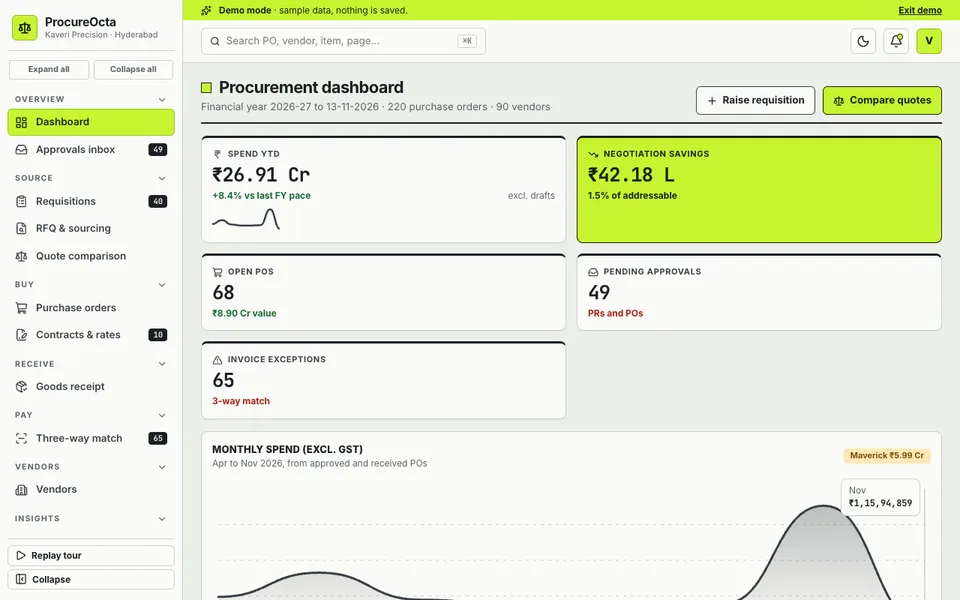
We built ProcureOcta as an interactive buyer-side sourcing demo for mid-size Indian companies such as manufacturers, hospitals and real estate developers. It is listed on our demo apps page. Its two signature screens are the Quote comparison and the Three-way match.
- Dashboard: spend year to date, negotiation savings, open POs, pending approvals and invoice exceptions.
- Approvals inbox, team and delegation: approvers act with comments within the limits you set, including from a phone.
- Requisitions and RFQ: the request side of the chain.
- Quote comparison: line items by vendors with landed cost, weighted scoring sliders that re-rank vendors live, split awards and one-click PO creation.
- Purchase orders, contracts and rates, goods receipt: the agreement and delivery side.
- Three-way match: PO against GRN against invoice with your tolerance rules, and exceptions to approve, hold or dispute with a reason.
- Vendors: scorecards, a KYC onboarding checklist with identifiers masked, and blacklisting.
- Budgets and spend, reports, settings.
- Source Studio: seven simulated AI helpers, including a vendor recommender, quote normaliser, benchmark and negotiation emails.
The demo is a sandbox: it uses fictional names and sample data, nothing you do is saved, everything resets when you refresh, and the Source Studio helpers are simulated, not real models. It runs in the browser on desktop, tablet and phone layouts.
How to try it
Open the demo and click Try Demo Account on the login screen. Go to Quote comparison and move the weight sliders to see vendors re-rank. Then open Three-way match and change the price tolerance to watch the exception queue update.
Getting procurement software built for your company
Approval limits, item masters and tolerance rules differ in every company, so a procurement system should follow yours. To discuss something similar, contact Zenocta about a custom build. We will review how your team buys and receives, and send a scoped, fixed-price proposal. Zenocta is a Hyderabad studio of 11 people working with clients across India and abroad, and you can see our production apps. For related reading, see billing and inventory management software for retail shops, business automation ideas for manufacturing companies and how MSMEs reduce costs through digital transformation.
Try it live
Open the real thing: demos run in a new tab with sample data, apps link to their own page.
 Live demoProcureOcta live demoRe-rank vendors with weight sliders on the quote comparison and clear exceptions in the three-way match, all on sample data.
- ABrowse allAll demo appsInteractive demos for dozens of industries, no sign-up needed.
- ZBrowse allZenocta appsProduction apps live on Google Play.
- TBrowse allTalk about a custom buildDescribe how your team buys and get a scoped, fixed-price proposal.
Frequently asked questions
01What is a three-way match in procurement?
It compares the purchase order, the goods receipt note and the vendor invoice line by line. If quantity and price agree within your tolerance, payment can proceed. If not, the difference goes to an exception queue for approval, hold or dispute.
02Why compare quotes on landed cost?
Landed cost adds freight and other charges to the material price, so each vendor is compared on what you will actually pay. A lower unit price with higher freight can leave the total unchanged, as in the worked example above.
03What tolerance should I set in a three-way match?
That is your decision, based on the value and risk of the goods. Many teams start with generous limits so the exception list stays short, then tighten them as the process settles. Check the policy with your finance team.
04Is ProcureOcta a product I can buy?
No. ProcureOcta is an interactive demo with fictional names and sample data. Nothing is saved, everything resets on refresh and the Source Studio helpers are simulated. It shows what Zenocta can build for a purchase team.
05How can I get procurement software built for my company?
Contact Zenocta with a description of your approval limits, vendor process and receiving routine. We review them and reply with a scoped, fixed-price proposal for a custom build.