In this guide
A housekeeping or security agency does not sell a product, it sells a promise that something will be done every day at every client site. The client cannot see most of that work, so the agency needs evidence: who turned up, what was checked, what went wrong and how fast it was fixed. This guide explains how facility management software for housekeeping and security agencies turns that evidence into scores, penalties you can predict and invoices you can defend.
Where does a facility-services contract usually go wrong?
Facility contracts are written around service levels. The client expects a number of people on shift, a standard of cleanliness or vigilance, and a response time when something breaks. In return, the contract usually allows deductions when the agency falls short. The agency, meanwhile, is managing dozens of sites, hundreds of people and a supervisor at each location who reports by phone call or WhatsApp.
The weak points are predictable:
- The roster lives in a spreadsheet. When someone is on leave, cover is arranged by calling around, and the spreadsheet is updated, if at all, the next day.
- Inspections are subjective. One supervisor says the site is fine, the client's manager says it is dirty, and neither has a number.
- Complaints have no clock. A client emails about a blocked drain on Monday and nobody records when it was closed.
- Penalties arrive as a surprise. The client deducts from the invoice, and the agency learns of it at payment time.
Software cannot clean a restroom. It can make sure the cleaning is planned, checked, scored and billed from one record.
What does a site roster need to do?
The roster is the first promise: the right number of people at the right site on the right shift. The most useful view for an agency is a grid, sites down the side and days across the top, with staff placed in the cells. Gaps are visible at a glance. A red cell means a post is uncovered today.
Three details separate a working roster from a pretty one. First, moving a person from one cell to another should take one action, because that is what happens when someone calls in sick at 6 am. Second, leave should be recorded against the roster, so cover is planned before the shift, not discovered during it. Third, attendance should show who actually checked in and who is late, so the roster is compared against reality. If your staff have phones, a check-in tied to the site location shortens the argument at month end. Related tools for pay are covered in our guides on attendance management software and creating payslips for employees.
How do you turn "clean" into a score?
An inspection is a checklist walked at a site, with each item marked as pass or fail and sometimes a photo. The value comes when the results roll up into a score that the agency and the client both recognise. The simplest model is categories with weights.
A sample scorecard for a fictional office tower, with made-up weights and scores:
| Category | Weight | Score | Contribution |
|---|---|---|---|
| Restrooms | 30% | 88 | 26.4 |
| Lobby and common areas | 25% | 92 | 23.0 |
| Pantry | 15% | 80 | 12.0 |
| Waste handling | 15% | 75 | 11.3 |
| Staff turnout and uniform | 15% | 95 | 14.3 |
| Site score | 100% | 86.9 |
If the contract sets a minimum monthly score of 90, this site is in breach, and the weakest categories, waste handling and pantry, tell the supervisor exactly where to focus. If the contract sets 85, the site passes, but the trend matters: a score that has slipped for three weeks in a row will breach eventually.
Corrective actions close the loop
A failed inspection item should create a corrective action with an owner and a due date. Without that step, an inspection is a report; with it, it is a process. Many agencies find that the number of repeat failures, the same item failing in consecutive weeks, is a better signal of supervisor quality than the score itself.
How should incidents and the client view be handled?
Incidents and complaints need a clock. Whether it is a security incident, a spill, a missing consumable or a client complaint, each one should have a time logged, an owner, a closure target and a visible countdown. When the target is missed, the miss is counted, because many contracts penalise exactly that.
Clients, for their part, want a simple window into the service. A client view that shows the site score, open complaints and closure times, on a phone, replaces a monthly meeting full of arguments with a page both sides can read. Showing the same numbers to both sides is also the best defence against disputes. The client sees what you see.
How do SLA penalties and billing work in practice?
Penalty clauses vary widely, so use your own contract; here is a made-up example only to show the arithmetic. Suppose a monthly invoice of ₹4,00,000, a clause allowing 2 percent off when the monthly site score is below 90, and 1 percent off for each incident closed after its target, capped at 5 percent.
| Item | Sample working | Amount |
|---|---|---|
| Monthly invoice | Contract value | ₹4,00,000 |
| Score below 90 | 2% of invoice | -₹8,000 |
| Two incidents closed late | 1% each | -₹8,000 |
| Net before tax | Invoice less deductions | ₹3,84,000 |
Tax and other statutory treatment depend on current rules, so confirm them with your accountant. What matters for software is that the deductions are calculated from recorded scores and incident timers, shown on the invoice with the reason, and, where the client disputes one, backed by a credit note or a reversal that is itself recorded. An agency that can predict next month's deduction by mid-month can act before the invoice goes out.
Spreadsheet and WhatsApp, or purpose-built software?
| Approach | Where it works | Where it breaks |
|---|---|---|
| Spreadsheet roster and WhatsApp groups | A handful of sites with one coordinator | No scores, no incident clocks, penalties surface only at invoice time |
| Paper checklists at the site | Simple sites with stable supervisors | Hard to total, easy to backfill, nothing for the client to see |
| Purpose-built operations and SLA software | Many sites, many staff, contracts with penalties | Needs a vendor who understands contracts and rosters, and some training time |
How to roll it out and what to ask a vendor
- Start with two or three sites. Choose one easy site and one with a demanding client.
- Digitise the checklist you already use. Do not invent a new audit method on day one.
- Agree the scoring with the client. Weights and thresholds should be written down, so the score is not an agency-only number.
- Move the roster. Place people in the grid, add leave and cover.
- Start the incident clock. Log every complaint with a timer from the first day.
- Link billing last. When scores and timers are trusted, let them feed the invoice.
Questions to ask any vendor
- Can I define my own checklists, categories and weights per site?
- Does the roster show uncovered posts and let me move people in one action?
- Are incidents timed against closure targets?
- Can the client see a read-only view of their own sites only?
- Do penalty deductions come from recorded scores and timers?
- Can supervisors work from a phone at the site?
- Can I export everything if I change systems?
Mistakes to avoid
- Too many checklist items. A 90-item audit gets ticked without looking. Keep the list short and meaningful.
- Scores without actions. A low score nobody acts on is just a record of failure.
- Hiding data from the client. Transparent scores build trust; secret ones breed disputes.
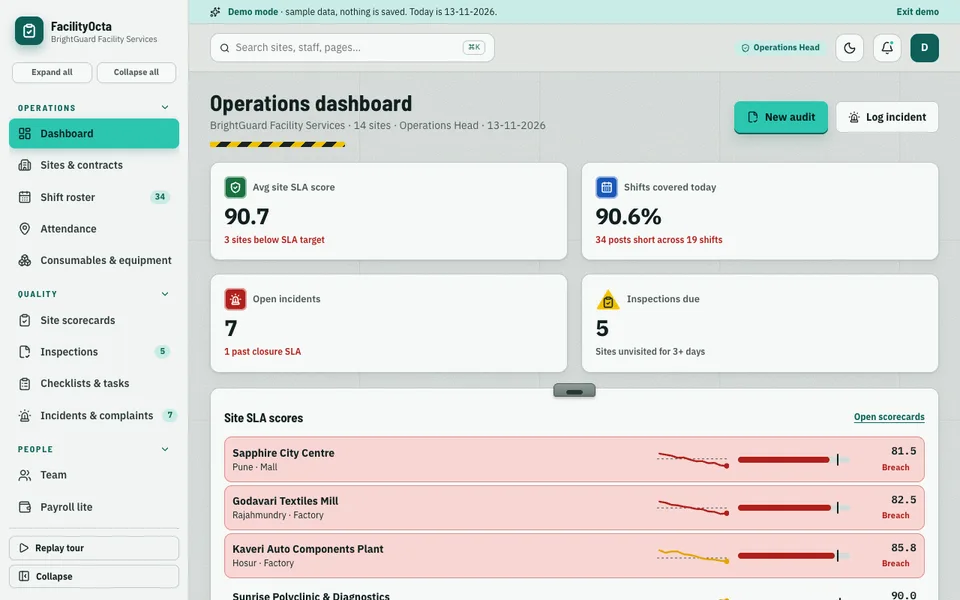
What the FacilityOcta demo shows
We built FacilityOcta as an interactive demo for housekeeping, security and facility-service companies with multi-site contracts. It is the operations and client-SLA layer, and it is listed with the rest of our demo apps. The sample company has:
- Dashboard, sites and contracts: the portfolio at a glance, with client SLAs and penalty terms.
- Shift roster: a site by day grid where you drag staff between cells (with a select fallback on touch) and plan leave cover.
- Attendance: a simulated geo-tag check-in and a late list.
- Site scorecards: a score ring, category scores, a 12-week sparkline, drill-in, a compare-sites view, a client-view toggle and SLA breach highlighting.
- Inspections, checklists and tasks: create an audit and raise corrective actions.
- Incidents and complaints: closure SLA timers.
- Consumables and equipment, team, payroll lite.
- Client portal preview: shown inside a phone frame.
- Billing and SLA penalties: deductions and credit notes.
- Site Studio: seven tabs of simulated AI: roster auto-filler, inspection photo checker, SLA breach predictor, incident triage, cost-to-serve estimator, training gap finder and client report writer in Hindi, English and Telugu.
The honest fine print: all of it is sample data for a fictional company, nothing you enter is saved, the state resets on refresh, and the Site Studio tabs are deterministic scripted demos, not real models. It runs in the browser on desktop, tablet and phone.
How to try it
Open the demo and press Try Demo Account on the login screen. Visit Site scorecards, switch to the client view, and open a site that is highlighted for an SLA breach. Then drag a person to a new cell in the Shift roster.
Getting facility software built for your agency
Your contracts, scoring and penalty terms are specific to your clients, and software should be built around them. If you would like something like this, talk to Zenocta about a custom build. We will review your rosters, checklists and contract terms and send a scoped, fixed-price proposal. Zenocta’s most experienced team members have 9+ years in the field, and we have 30+ apps, as you can see on our apps page. For a related example of a building-operations workflow, read our guide to apartment maintenance management software, and for the wider case, why MSMEs invest in custom software.
Try it live
Open the real thing: demos run in a new tab with sample data, apps link to their own page.
 Live demoFacilityOcta live demoOpen the site scorecards, drag staff in the shift roster and preview the client portal, all on sample data.
- ABrowse allAll demo appsInteractive demos for dozens of industries, no sign-up needed.
- ZBrowse allZenocta appsProduction apps live on Google Play.
- TBrowse allTalk about a custom buildShare your sites, checklists and contract terms and get a scoped, fixed-price proposal.
Frequently asked questions
01What does facility management software do for a housekeeping agency?
It plans the roster across client sites, records attendance, runs inspection checklists that roll up into scores, times incidents against closure targets and links all of that to invoices and SLA deductions, giving the agency and the client one shared record.
02How can inspections be scored fairly?
Group checklist items into categories, give each category a weight, and compute a site score from the results. Agree weights and thresholds with the client in writing so that the score is a shared measure, not an agency-only opinion.
03Can software calculate SLA penalties automatically?
Yes, if the contract terms are entered. Deductions can be calculated from recorded scores and late-closed incidents and shown on the invoice with reasons. Always check the actual contract and current tax rules with your accountant.
04Is FacilityOcta a product I can buy?
No. FacilityOcta is an interactive demo with sample data for a fictional company. Nothing is saved, state resets on refresh, and the Site Studio tabs are simulated scripted demos. It shows what Zenocta can build for a facility-services business.
05How can I get a facility management system built?
Contact Zenocta with details of your sites, rosters, checklists and contract penalty terms. We review them and respond with a scoped, fixed-price proposal for a custom build, delivered remotely from Hyderabad.