In this guide
A customer picks up a car, sees a bill higher than the phone estimate, and asks why brake pads were changed when nobody called to ask. The workshop says the mechanic told the supervisor. That conversation is the most common dispute in any garage, and it comes from one gap: the work was never approved in a way anyone can show. This guide covers garage management software for car and bike workshops and what to look for.
Where do garages lose money and trust?
A busy workshop runs on shouted instructions and handwritten job cards. It works until volume rises. Then the same problems repeat every week.
- Unapproved extra work. The mechanic finds a worn part, fits it, and the customer sees it only on the bill.
- Vehicles waiting without anyone knowing why. A car sits for a day because the part was not ordered, and the customer calls three times.
- Parts that vanish from stock. Used on a job but never recorded, so the shelf and the register disagree.
- Customers who never come back for the next service. Nobody remembers when the last one was done.
- Insurance claims lost in paperwork. Photos, estimates and surveyor approvals scattered across phones.
Garage software is, at heart, a system for making work visible and approved before it happens.
What does a vehicle's journey through your workshop look like?
Every vehicle follows a path, whether or not you have named it. A booking or walk-in arrives, the vehicle is inspected, an estimate is made, the customer approves, the work is done, the vehicle is checked and washed, the bill is raised, and the vehicle is delivered. A job card is the single record that follows it along this path.
A kanban board of job cards, with columns for each stage, shows the whole workshop at a glance. The supervisor can see how many vehicles are waiting for approval, how many are waiting for parts, and which ones are ready for delivery. Dragging a card from one column to the next is also the moment the status changes for the front desk, so the customer gets a true answer on the phone.
Many workshops also keep a bay board: a floor plan showing which bay holds which vehicle and for how long. It stops the situation where two cars are promised the same lift, and it shows how long each job has been occupying space.
What is a digital vehicle inspection and why do customers trust it?
A digital inspection replaces the mechanic's verbal verdict with a visible checklist. The usual method is a traffic-light rating: green means fine, amber means it will need attention soon, red means it needs work now. Each red or amber item can carry a photo and a note.
A sample inspection might read like this:
- Front brake pads: red, worn to the wear mark, photo attached
- Engine oil: amber, due at the next service
- Tyres: green, tread within limits
- Battery terminals: amber, some corrosion, cleaned and noted
- Wiper blades: green
The customer receives a link on their phone, reads the list, and approves or declines each item. The workshop now has a record: what was found, what was approved, and when. The argument at the counter disappears, because the customer decided with the evidence in front of them.
How do you build an estimate that protects your margin?
An estimate has two parts: parts and labour. Parts carry a cost price and a selling price; labour is usually a standard time multiplied by an hourly rate. Taxes are added on top as the current rules require.
Here is a small illustration with invented figures:
| Line | Cost (₹) | Sell (₹) | Margin (₹) |
|---|---|---|---|
| Front brake pad set | 1,300 | 1,800 | 500 |
| Labour, brake pad change | 300 | 600 | 300 |
| Engine oil and filter | 1,100 | 1,500 | 400 |
| Total before tax | 2,700 | 3,900 | 1,200 |
Showing margin on each line, visible only to the owner, helps you notice parts where you are underpricing. A good-better-best layout works well here too: an economy part, a standard part and a premium part, so the customer chooses and the upsell is a conversation rather than a surprise.
How do service reminders bring customers back?
Most service intervals depend on both distance and time, whichever comes first. If a vehicle was serviced at 24,000 km, the interval is 5,000 km, and the owner drives roughly 1,000 km a month, the next service is due in about five months. A reminder that arrives at that point, in the customer's preferred channel, is far more welcome than a generic offer.
The data you need is simple: the odometer reading at each visit, the service interval for that vehicle and the customer's phone number. From that, a list of vehicles approaching service is easy to produce. An odometer-based view, grouping vehicles by how close they are to due, lets the front desk call the right people on the right day. If you want to see this from the customer's side, read our guide on booking a car service online.
Parts, suppliers and insurance work
Parts management is stock management with a twist: many parts are ordered specially for one job. A workable system tracks fast-moving items with reorder levels and treats special orders as purchase orders linked to a job card. The principles are the same as in our guide to billing and inventory for shops, with a few extra fields for vehicle compatibility.
Insurance claim jobs need their own trail: the damage photos, the estimate sent to the insurer, approval status, and the parts and labour actually used. Missing one document delays payment, so a checklist per claim is worth having.
Paper, spreadsheet or workshop software?
| Need | Paper job cards | Spreadsheet | Workshop software |
|---|---|---|---|
| Know where each vehicle is | Walk the floor | A status column | Job card board and bay board |
| Prove customer approval | Verbal | Note in a cell | Approval recorded from the inspection link |
| Estimate with margin | Calculator | Formulas | Parts and labour with margin visible |
| Stock accuracy | Periodic count | Manual updates | Parts deducted when used on a job |
| Bring customers back | Memory | Dates to sort | Reminders by odometer and date |
How do you introduce software without slowing the floor?
- Start with the front desk. Create customers and vehicles and open job cards there.
- Add the inspection next. Have one service advisor use it on every vehicle for a week.
- Move estimates and approvals into the system. This is where trust improves.
- Load parts and set reorder levels. Begin with the 50 parts you reorder most often.
- Turn on service reminders. After a few months of history they start to pay back.
- Add insurance jobs and supplier orders. By now the habit is in place.
What should you ask a garage software vendor?
- Can customers approve work from a link on their own phone, and is the approval timestamped?
- Does it work on a tablet for mechanics, with photos?
- Can I see margin per job and per part, and who can see it?
- How are service reminders calculated, by distance, by date or both?
- Can I export customers, vehicles and invoices?
- Is pricing per user, per workshop or a one-time build, and is hosting billed separately?
Mistakes workshops make with software
- Skipping vehicle data. Without registration and odometer history, reminders have nothing to work with.
- Letting mechanics bypass the card. If work starts before the job card exists, parts and approvals go unrecorded.
- Over-promising on AI. Damage-from-photo and symptom diagnosis tools can suggest, but a trained person must confirm.
- Ignoring bike customers' habits. Two-wheeler customers often walk in without booking, so walk-in intake must be very quick.
What the GarageOcta demo shows
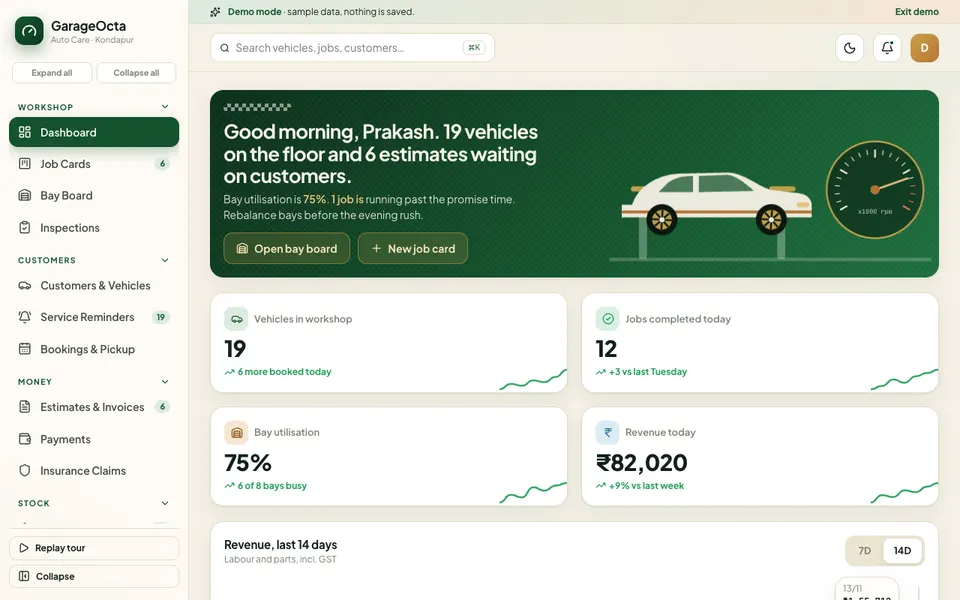
GarageOcta is an interactive Zenocta demo of car and bike workshop management. It uses a sample Hyderabad workshop with synthetic data. Nothing is saved, the data resets when you refresh, and the AI features are scripted simulations. It shows what a custom workshop system could contain. It is not a product with customers.
- Job Cards. A seven-stage drag-and-drop kanban plus a list view.
- Bay Board. An SVG floor plan with 8 bays and live timers; drag a waiting vehicle onto a free bay.
- Digital Inspections. Top-down car hotspots, a traffic-light checklist and an approval link with a phone view for the customer.
- Customers and Vehicles, Service Reminders, Bookings and Pickup. Including an odometer radar.
- Estimates and Invoices, Payments, Insurance Claims. Parts and labour, GST and margin.
- Parts and Inventory, Suppliers and POs. Eighty sample parts.
- Analytics. Four tabs: Overview, Workshop, Revenue and Customers.
- Garage Studio (simulated AI). Symptom diagnosis, damage detection from a photo, a good, better and best estimate with upsell, a service reminder predictor, a parts demand forecast, a job-time predictor and an insurance claim checker.
Limits to know: photos are placeholders, inspection photo upload is not functional, and WhatsApp and payments are not real. A simulated live event appears roughly every 25 seconds, up to five times.
How to try the GarageOcta demo
- Open garageocta.zenocta.com.
- On the login screen, choose Try Demo Account. Any sign-in works, and a spotlight tour starts.
- Open Job Cards and drag a card to the next stage.
- Open Digital Inspections and look at the traffic-light checklist and the customer's phone view.
- Open Garage Studio and run the estimate tool. Refresh the page to reset the sample data.
Other industries are on the demo apps page.
Getting a workshop system built around your garage
A multi-brand car workshop, a two-wheeler service centre and a body shop all work differently. They differ in bays, approval habits and insurance volume. Zenocta builds custom software to match your workflow. We begin with a conversation about how your vehicles move today and return a scoped, fixed-price proposal. You can talk to us about a custom build, or see our finished work in the apps on Google Play.
If your team also does visits at customer sites, see how to dispatch technicians. For EV owners, our piece on tracking EV running cost shows what customers are starting to measure.
Try it live
Open the real thing: demos run in a new tab with sample data, apps link to their own page.
 Live demoGarageOcta live demoOpen a sample workshop: job card board, bay floor plan, digital inspection, estimates, parts and reminders.
- ABrowse allAll demo appsBrowse every interactive demo, each with a sample company and nothing saved.
- ZBrowse allZenocta appsProduction apps live on Google Play.
- TBrowse allTalk about a custom buildTell us how your business runs and get a scoped, fixed-price proposal.
Frequently asked questions
01What does garage management software do?
It manages the workshop from booking to delivery: job cards, vehicle inspections, customer approvals, estimates and invoices, parts and suppliers, service reminders and insurance claim jobs, all linked to the customer and the vehicle.
02What is a digital vehicle inspection?
It is a checklist completed on a tablet or phone, usually rated green, amber or red, with photos and notes. The customer receives a link, reviews the findings and approves or declines each item, so the workshop has a record of what was agreed.
03How do service reminders work for cars and bikes?
The system stores the odometer reading and date of each service and the interval for that vehicle. It then lists vehicles approaching their next service so the workshop can contact the customer before it is due.
04Is GarageOcta a real garage product?
No. GarageOcta is an interactive demo with a sample Hyderabad workshop and synthetic data. Nothing is saved, data resets on refresh, and its Garage Studio AI tools are simulated. It shows what a custom workshop system could contain.
05Can Zenocta build a workshop system for my garage?
Yes. Zenocta builds custom business software. We start with how your vehicles move through the workshop, then provide a scoped, fixed-price proposal for job cards, inspections, estimates, parts and reminders.