In this guide
A job-work shop is paid for turning someone else's material into finished parts, yet the material itself is the thing most shops track worst. Challans sit in a drawer, parts wait on a shelf with a chalk mark, and nobody can say quickly which party's castings have been with you for 40 days. This guide explains how to track job work properly, what a returnable challan really demands of you, and what to look for in job work management software for MSME shops.
Where does job work go wrong in a typical MSME shop?
Most CNC, turning, press and fabrication shops run the same way. A party's truck arrives with raw material. Someone writes an inward challan in a register, the stores person counts roughly, and the lot goes to a machine. The job card is a piece of paper or a WhatsApp photo. Operations happen in sequence, but the sequence lives in the supervisor's head. At the end, an outward challan is written by hand, and the invoice is prepared from memory a week later.
The cracks appear in the same places every time:
- Quantity drift. You received 500 pieces, delivered 488 good ones, and nobody wrote down where the other 12 went: rejection, scrap, or still on a shelf.
- Forgotten lots. A party sends material for a rush job, the rush passes, and the lot sits in a corner. Months later the party asks for it, or an auditor does.
- Billing leakage. A part goes through turning, drilling and deburring, but the invoice only charges turning because the other two operations were never noted.
- Disputes you cannot settle. When a party says it sent 520 pieces and you say 500, a hand-written register is a weak witness.
None of these problems needs a heavy ERP. They need one chain of records that follows the material from the gate to the gate, in the order it actually moves.
What is a returnable challan, and why does its age matter?
In the third-party job-work model, the party remains the owner of the material. You are a processor, not a buyer. The material arrives on an inward challan that says what was received, and it leaves on an outward challan that says what went back. Between those two documents, the material is in your custody, and the paper trail should show it.
The tax rules around goods sent for job work set a time limit for goods to come back, and the limit differs by goods type. We do not quote it here: check the current rules with your accountant, because they change. What a shop owner can act on today is the age of every open challan, meaning how many days the party's material has been with you.
Ageing turns a vague worry into a short list. Here is a sample ageing view, with made-up numbers for illustration only:
| Party (sample) | Inward challan | Pieces open | Days with you | Action |
|---|---|---|---|---|
| Party A | IN-0412 | 140 | 9 | On track, in lane 2 |
| Party B | IN-0398 | 60 | 27 | Ask: waiting for drawing revision? |
| Party C | IN-0351 | 300 | 52 | Escalate: finish or return this week |
A shop that reads this table every Monday morning stops carrying other people's problems on its shelves. A shop that does not read it finds out when a party calls.
Tip
Pick two ageing bands that match your own shop, for example "over 30 days" and "over 60 days", and make the bands visible to the supervisor, not only the accountant. The person who can move the lot is the person who needs to see the number.
How should material move through the shop?
Think of the shop as a set of lanes, one per operation or work centre: cutting, turning, milling, drilling, press, welding, finishing, inspection. A job is a lot of parts that moves from lane to lane. Seeing every job as a card in a lane gives you three things at once: where it is, how long it has been there, and which lane is crowded.
Inward: the first record decides the rest
The inward challan should capture the party, the part, the quantity received, the date and ideally the drawing or revision. Counting at the gate, even roughly, is worth the two minutes, because every later number depends on it. If the first record is wrong, every report downstream inherits the error.
In process: job cards and lanes
Each lot gets a job card listing operations in order. As operations finish, the card moves to the next lane. When quantities change, for example 4 pieces rejected at inspection, the change is written against the card at the moment it happens, not reconstructed on Friday.
Outward: reconcile before the truck leaves
An outward challan should be matched against the inward one: received, delivered good, rejected and returned, scrapped with approval, still open. When those four buckets add up to the inward quantity, the lot is closed. When they do not, you know before the party does.
How do you bill per operation without leaking money?
Job work is usually priced per piece per operation. A bracket might cost one rate for turning, another for drilling and a third for finishing. The invoice is only as complete as the record of which operations were actually performed on which lots.
A simple example, with made-up rates: a lot of 200 brackets goes through three operations at three different per-piece rates. If the job card shows all three operations complete, the invoice has three lines. If the card shows only turning, the invoice has one line, and the shop quietly donates two operations. Per-operation billing in software works because the operations are already on the job card, so the invoice is a summary of work done, not a reconstruction.
Add the commercial layer around it: advances taken from the party, tax deducted at source where it applies, and the party ledger that shows what is open. Check the current tax rules for your case; the point for software is that the ledger shows invoiced, received, deducted and still due in one place.
Party-owned stock and piece-rate wages
Because the material belongs to the party, your stock register is really a set of small stock registers, one per party. Showing "material stock by party" answers the question "what do I hold for Party B right now?" without opening a drawer. If your operators are paid per piece, the same job card records feed piece-rate wages, so the person who made 180 good pieces is paid for 180, not for a supervisor's recollection.
Spreadsheet, paper register or purpose-built software?
Every shop starts with paper or a spreadsheet, and that is fine for a while. The question is when the cost of the workaround overtakes the cost of a proper system.
| Approach | Strength | Where it breaks |
|---|---|---|
| Paper challan register | Zero setup, everyone understands it | No ageing view, hard to search, easy to lose, no link to billing |
| Spreadsheet | Flexible, cheap, quick to start | One editor at a time, formulas break, no job-lane view, easy to overwrite history |
| Purpose-built job-work software | Challans, lanes, quality and billing linked by one record | Needs setup, training and a vendor who understands job work |
A reasonable rule: if you handle more than a handful of parties at once, or if you have ever disputed a quantity, the spreadsheet is already costing you more than it saves.
How do you roll out job-work software step by step?
- List your parties and parts. Start with the ten parties and the fifty parts that make up most of your work, not the whole history.
- Define your lanes. One lane per real operation or work centre. If you have to explain a lane to a new operator, it is probably two lanes.
- Enter only open challans. Load what is physically in the shop today. Do not retype last year.
- Run both systems for one week. Keep paper as backup, but ask the supervisor to answer "where is lot X?" from the screen.
- Add quality and rejection next. Once lots move reliably, record rejections at the moment they occur.
- Turn on billing last. Billing from the job card only works when the cards are trustworthy.
What should you ask any job-work software vendor?
- Can I see open challans by age, per party, without a report request?
- Does the outward challan reconcile against the inward one automatically?
- Can I bill per operation, per piece, with different rates by part and by party?
- Is party-owned material kept separate from my own stock?
- Can the supervisor move a job between lanes from a phone or tablet?
- How do I export my data if I leave?
- Who can see rates and ledgers, and who only sees job cards?
Mistakes that undo a good rollout
- Building lanes around departments, not operations. You cannot see a bottleneck inside a department called "Production".
- Skipping the gate count. The software cannot be more accurate than the first entry.
- Treating rejection as a note. If rejection is free text, you cannot add it up or bill around it.
- Letting billing run ahead of the cards. An invoice built on incomplete cards bakes the leakage into your ledger.
What the JobWorkOcta demo shows
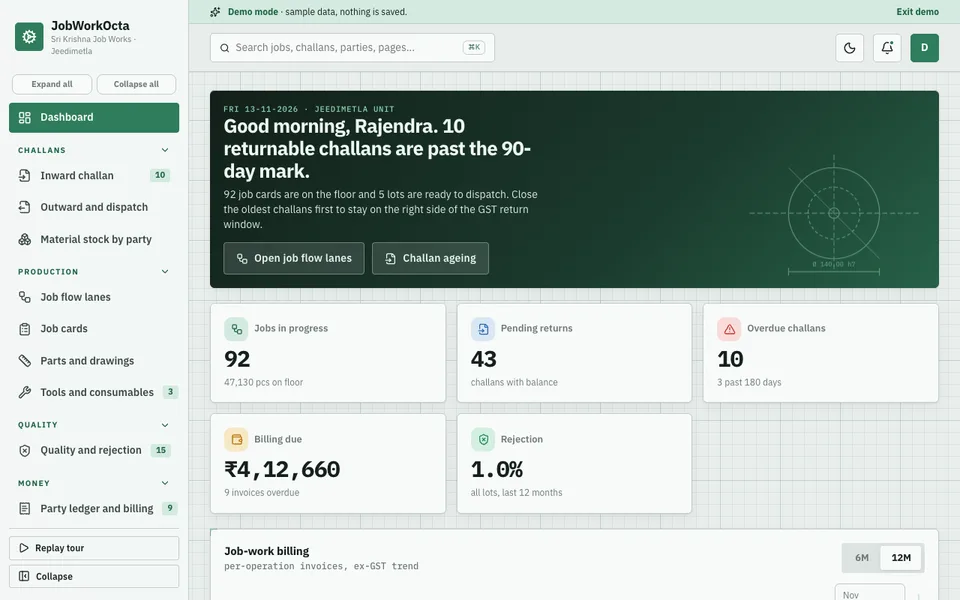
We built JobWorkOcta as an interactive demo of exactly this model: a third-party job-work shop for CNC, turning, press, fabrication and auto components. Material arrives on an inward challan, moves through operation lanes and leaves on an outward challan, billed per operation. It is one of the interactive demos listed on our demo apps page.
The modules the demo includes, and why each one matters:
- Dashboard: the day's picture in one screen, so the owner does not open five registers.
- Inward challan: the first record of every lot, with a badge for ageing.
- Job flow lanes: lots as cards across operation lanes, moved by drag and drop, with a select menu as a fallback on touch screens, and returnable-challan ageing shown on the cards.
- Job cards and parts with drawings: what is to be done to a lot, and against which drawing.
- Outward and dispatch with reconciliation: matching what went out against what came in.
- Quality and rejection: rejections recorded as numbers, not remarks.
- Party ledger and billing: per-operation billing with GST, TDS and advances.
- Material stock by party, tools and consumables, piece-rate wages: the supporting records a real shop needs.
- Analytics, team and settings: reports and role control.
- Job Studio: seven tabs of AI-style helpers. These are simulated, scripted for the demo, and not real models.
The demo runs entirely in your browser on desktop, tablet and phone layouts. It uses sample data for a fictional shop, nothing you enter is saved, the data resets when you refresh the page, and anything that looks like AI is simulated. It shows what is possible; it is not a product you subscribe to.
How to try it
Open the demo and choose Try Demo Account on the login screen. Start with Job flow lanes and move a card to another lane, then open the inward challan list and look at the ageing badges. Finish at the party ledger to see how operations turn into invoice lines.
Getting job-work software built for your shop
Every shop's lanes, parts and parties are different. A demo shows the pattern; a real build uses your operations, your challan format, your rate cards and your approvals. If you want something like this for your own job-work shop, talk to Zenocta about a custom build. We will look at how your material actually moves and send a scoped, fixed-price proposal. Zenocta is a Hyderabad software studio, whose most experienced members have 9+ years in the field, working with clients across India and abroad, and you can see our production apps on Google Play for the quality we ship. For more on where software pays back in a workshop, read our guides on production management software for manufacturers, automation ideas for manufacturing companies and why MSMEs invest in custom software.
Try it live
Open the real thing: demos run in a new tab with sample data, apps link to their own page.
 Live demoJobWorkOcta live demoMove job cards between operation lanes, check challan ageing and see per-operation billing, all on sample data.
- ABrowse allAll demo appsInteractive demos for dozens of industries, no sign-up needed.
- ZBrowse allZenocta appsProduction apps live on Google Play.
- TBrowse allTalk about a custom buildTell us how material moves in your shop and get a scoped, fixed-price proposal.
Frequently asked questions
01What is a returnable challan in job work?
It is the delivery challan under which a party sends you material to be processed and returned. You hold the goods in custody, not as stock you own. Track how many days each challan has been open, and check the current rules for time limits.
02Can a spreadsheet manage job work challans?
For a few parties, yes. It breaks when several people edit it, when you need an ageing view, or when you want billing to follow the operations done. At that point a purpose-built system saves more time than it costs to set up.
03What is per-operation billing?
It means pricing each operation on a part, such as turning, drilling or finishing, at its own per-piece rate and invoicing only the operations completed. Software makes it reliable by reading the operations from the job card instead of from memory.
04Is the JobWorkOcta demo a real product I can subscribe to?
No. It is an interactive demo with sample data for a fictional shop. Nothing is saved, the data resets on refresh and the AI tabs are simulated. It shows what Zenocta can build for a job-work business.
05How do I get job work software built for my shop?
Contact Zenocta with a short description of your lanes, parties and challan format. We review how material moves in your shop and reply with a scoped, fixed-price proposal for a custom build.