In this guide
A founder posts a role on three job sites, forwards forty resumes to a hiring manager over email, and loses track of who was called, who was rejected and who was promised a callback. Two weeks later the best candidate has taken another offer. An applicant tracking system for startups is not about enterprise HR process: it is about making sure every candidate always has an owner, a stage and a next step.
Where does a startup hiring process break?
Most early teams hire out of a shared inbox, a spreadsheet and a WhatsApp group. That is fine for one role a quarter. It stops working the moment you have three open roles, two interviewers and a candidate who asks, "Any update?"
- Resumes with no home. They sit in email attachments, so nobody can say how many people applied for a role or where they came from.
- Interview clashes. An interviewer is booked twice in the same hour, or a candidate is offered a slot the panel cannot make.
- Feedback in chat. "Seemed good" in a message thread is not a decision. Two interviewers disagree and nobody can see why.
- Silent candidates. People who are waiting for a reply for a week assume the answer is no and accept something else.
- No view of speed. You cannot fix a slow process you cannot measure.
What is an applicant tracking system, in plain words?
It is a shared record of every candidate for every job, moving through the same set of stages. Four ideas do most of the work.
A pipeline per job
Each role has its own list of stages, for example applied, screened, interview, offer and hired. Candidates sit in one stage at a time, so you can see the whole job at a glance. A kanban board, where you drag a card from one column to the next, is the most natural way to show this.
A candidate profile
One page holds the resume, contact details, notes, interview history and every message. When a second interviewer joins, they read the same page instead of asking around.
A structured scorecard
Instead of "seemed good", each interviewer rates the same few skills on the same scale. Scores can be compared, and a disagreement shows up as a number you can discuss.
Reports on the funnel
Counting how many candidates reach each stage, and how long they stay there, tells you where the process leaks.
A funnel worked through with made-up numbers
Here is a sample role with illustrative figures. They are not benchmarks, only a way to show how to read your own funnel.
| Stage | Candidates | Share of the previous stage |
|---|---|---|
| Applied | 200 | Not applicable |
| Screened | 60 | 30% |
| Interviewed | 24 | 40% |
| Offered | 6 | 25% |
| Accepted | 4 | 67% (rounded) |
Two of the six offers were declined. If you only counted hires you would not notice. Looking at the last row, you would ask why a third of offers fail: pay, speed, or a slow reply to the candidate's questions. Now add time. Suppose candidates wait 3 days from applying to screening, 5 days from screening to the first interview, 6 days from interview to offer and 4 days from offer to decision. That is 18 days in total, and the 6-day gap before an offer is the one to attack first, because that is when a strong candidate is most likely to have other options.
How do you run interviews without clashes?
Interview scheduling is where small teams lose the most time, because every slot involves at least three calendars: the candidate's, the interviewer's and the room or video link. A good system helps in three ways.
- It shows the week as a calendar and lets you drag an interview into a slot.
- It warns you when the interviewer already has something at that time.
- It suggests free slots, so you offer the candidate options instead of asking them to guess.
Some systems also let the candidate pick a time themselves from the slots you have opened. That removes a round of messages for each person, which adds up over a hiring season.
Tip
Decide the scorecard before the first interview, not after. If the panel agrees on four or five skills for the role, the feedback you collect is comparable. If everyone invents their own criteria, you are back to opinions.
Sourcing, offers and onboarding
Your careers page and your talent pool
Not every good candidate is hired for the first role they apply for. A talent pool is a list of people you liked and could contact when a similar role opens. Tag them by skill and source, and a future hire can take days instead of weeks.
A careers page is the one place on your own website where open roles live. When it is connected to the pipeline, an application lands in the right job automatically. A careers page needs to work well on a phone, since many candidates will open it from a message or a social post.
If you refer people informally, a referral ledger is worth having too: who referred whom, which stage the candidate is at, and whether a referral bonus is due and has been paid. Without it, the bonus is a source of friction. Check the current rules on how bonuses and payments are treated before you set a scheme.
Offers, onboarding and the handover
The offer is a stage, not the end. A candidate can accept, decline or ask to negotiate. Track each of those, and when an offer is accepted, start an onboarding checklist: documents to collect, accounts to set up, equipment, a first-day plan. If you want to continue the thread into pay and attendance, our guide to payroll and attendance software for small business covers what comes next. Offer letters and employment terms are legal documents, so check the current rules or ask an adviser before you rely on any template.
A rollout plan for a team of ten to fifty
- Write down your stages. Five or six is enough. Use the same names for every role.
- Import the live candidates. Start with the open roles only. Ignore the archive for now.
- Agree the scorecard. Four or five skills per role, one scale, a short comment box.
- Move scheduling into the system. One calendar view for the hiring team.
- Connect the careers page. Applications arrive in the right job with no copying.
- Review the funnel monthly. Look at stage counts and days per stage, then change one thing.
Choosing or commissioning a tracker
What to ask any vendor, or your own developer
- Can each job have its own pipeline stages?
- Can several interviewers score the same candidate separately and see a combined view?
- Does scheduling warn about clashes?
- Can I export every candidate and every note if I leave?
- Who can see candidate data, and can I limit it by role?
- How are candidate personal details stored and deleted? Check the current rules on data protection that apply to you.
- If the system offers resume ranking or suggestions, can a person always override it and see why?
Common mistakes to avoid
- Too many stages. Ten columns slow everyone down. Merge until each stage means a real decision.
- Letting software decide. A resume score is a prompt to read a resume, not a verdict.
- No reply standard. Decide a maximum wait for a candidate update and measure it.
- Skipping the rejection. A short, kind message to candidates you decline builds a reputation that helps the next hire.
- Using a spreadsheet for too long. It is fine for one role and costly for five.
Spreadsheet, shared inbox or purpose-built tracker?
| Approach | Works well for | Where it fails |
|---|---|---|
| Spreadsheet | One or two roles, one recruiter | No scheduling, no scorecards, easy to overwrite, no history |
| Shared inbox and chat | Fast conversations | No stage view, feedback is scattered, candidates fall through |
| Purpose-built tracker | Several roles, several interviewers, a growing team | Needs agreed stages and a little discipline to keep updated |
What the HireOcta demo shows
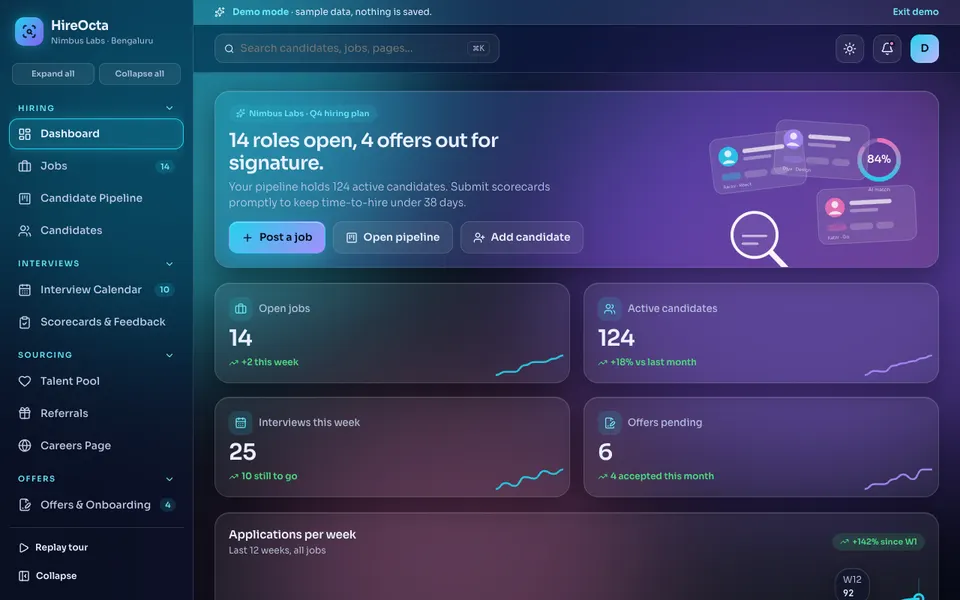
HireOcta is an interactive demo for a fictional company called Nimbus Labs. It uses sample data, nothing you do is saved, the data resets when you refresh the page, and everything described as AI is a scripted, simulated tool. Here is what you can click through.
- Dashboard, Jobs and templates. A list of roles with job templates, and a detail page where each job has its own pipeline.
- Candidate Pipeline. A drag-and-drop kanban board so you can move people between stages in one gesture.
- Candidates. A table with a side drawer for the profile, so you read the candidate without leaving the list.
- Interview Calendar. Drag to schedule, a conflict check, slot suggestions and a preview of how a candidate would self-schedule. The sample calendar shows one fixed week.
- Scorecards and Feedback. A split view with the resume on one side and a radar chart scorecard on the other.
- Talent Pool and Referrals. A saved list of past candidates, and a referral ledger with bonus payouts.
- Careers Page. A builder with a desktop and a phone preview.
- Offers and Onboarding. A mock e-sign step, accept and decline, and onboarding checklists.
- Analytics. Funnel, speed, sources and team views, the same questions as the worked example above.
- Hire Studio. A resume screener, JD writer, interview kit, candidate summary, inclusive-language checker, offer acceptance predictor and outreach writer. These are scripted and simulated, and a human makes every decision.
How to try it
Open the HireOcta live demo and press Try Demo Account on the login screen. Start with the pipeline board and drag a candidate forward, then open the calendar and try to book an interviewer who is already busy. You will see the conflict check. You can browse every other sample on the demo apps page, and see Zenocta's production apps on the apps page.
Getting something like it built
If you are hiring regularly, a tracker shaped around your stages, your interviewers and your careers page will pay back in speed and fewer lost candidates. Zenocta is a Hyderabad team of 11, whose most experienced members have 9+ years in the field, and we build for clients worldwide remotely. We begin with how you hire today, then send a scoped, fixed-price proposal for the pieces you need. The same thinking applies to any custom tool, as we explain in why every MSME should invest in custom software. When you are ready, talk to us about a custom build. If you are on the other side of the table, our guide to an ATS-friendly resume explains how candidates see the same systems.
Try it live
Open the real thing: demos run in a new tab with sample data, apps link to their own page.
 Live demoHireOcta live demoDrag candidates across a kanban pipeline, book interviews with a clash check, fill a scorecard and open the simulated Hire Studio.
- ABrowse allAll demo appsBrowse every interactive demo, each with a sample company and nothing saved.
- ZBrowse allZenocta appsProduction apps live on Google Play.
- TBrowse allTalk about a custom buildTell us how you hire today and get a scoped, fixed-price proposal.
Frequently asked questions
01What is an applicant tracking system?
It is a shared record of every candidate for every job, moving through set stages such as applied, screened, interview, offer and hired. It keeps resumes, notes, interview feedback and messages in one place instead of across email and chat.
02Does a small startup really need one?
If you hire for one role a quarter, a spreadsheet is enough. Once you have several open roles, more than one interviewer, or candidates waiting on replies, a pipeline with scheduling and scorecards saves time and stops people being lost.
03How do I measure whether my hiring process is working?
Count candidates at each stage, note how many accept offers, and track days spent in each stage. The stage with the longest wait or the biggest drop-off is the first thing to fix. Compare month to month, not against outside benchmarks.
04Is HireOcta a real hiring product?
No. HireOcta is an interactive demo for a fictional company with sample data. Nothing is saved, data resets on refresh, and its Hire Studio tools are simulated and scripted. It shows what Zenocta can build for a hiring team.
05Can Zenocta build a hiring tracker for my company?
Yes. Zenocta builds custom business software. We start with your stages, interviewers and careers page, then send a scoped, fixed-price proposal for the modules you actually need.