In this guide
It is 11 am, three new AC breakdown calls have come in, one technician is stuck in traffic and another has finished early. The dispatcher is juggling a phone, a notebook and a WhatsApp group, and every decision is a guess. This guide explains how to dispatch technicians properly, what field service management software should do, and how to judge whether your business is ready for it.
Why is dispatching technicians harder than it looks?
Dispatching looks like a simple matching job: a request comes in, so you send someone. In practice you are solving four problems at once, and a notebook cannot hold all of them.
- Skill. A split-AC gas top-up, an inverter repair and a solar panel inspection are not interchangeable.
- Location. Two jobs in the same area back to back save an hour. Two on opposite sides of the city lose it.
- Time window. The customer said "after lunch". Another said "before 11". A third has an annual service contract with a promised visit date.
- Parts. There is no point sending someone for a compressor job if the part is not on the van.
When this is run from memory, the usual symptoms appear: technicians double-booked, long idle gaps, repeat visits because the right part was missing, and customers calling to ask where the technician is. Each of these costs you money or goodwill.
What does a good dispatch board look like?
A dispatch board is a grid. Technicians are the rows, time of day is the columns, and each job is a block placed in a technician's lane. It is the same idea as a doctor's appointment book, with one important difference: the gaps between jobs are not free, because the technician has to travel.
| Time | Technician A | Technician B | What the dispatcher sees |
|---|---|---|---|
| 9:00 to 10:30 | AC service, area 1 | Fridge repair, area 3 | Both lanes busy, no gaps |
| 10:30 to 11:00 | Travel | Travel | Travel gap shown, not hidden |
| 11:00 to 12:30 | AC repair, area 1 | Free | B can take the new call in area 3 |
| 12:30 to 2:00 | Lunch and travel | New call, area 3 | No overlap, parts checked |
The sample above is invented, but the logic is real: you can see free time, you can see travel, and if you drag a job into a slot that overlaps another, the board should warn you before you promise anything to the customer.
Tip
Block the travel time between jobs as its own visible gap. Teams that only schedule the work itself usually overbook by a job or two every day, and then wonder why everyone is late.
What is a job card, and what belongs on it?
The job card is the record of one visit. It travels with the technician and becomes the proof of what was done, what was used and what the customer agreed to pay. Paper job cards get lost, and what is written on them rarely reaches the stock register. A digital card fixes both.
A useful card for an AC service might include:
- Customer name, address, phone and the unit being serviced
- A checklist: filters cleaned, coils cleaned, drain checked, gas pressure noted, capacitor and electrical readings recorded
- Parts used, so stock is deducted at the same moment
- Before and after photos as evidence
- Customer signature on completion
- Payment status: collected, pending or invoiced
The quiet benefit is stock. When parts are recorded on the job card, the van and warehouse stock numbers stay honest. That makes reordering a decision based on use, not on a technician saying "we ran out".
How do quotes turn into jobs without being retyped?
Many field businesses quote on WhatsApp, win the job, and then create the job card by hand. The same information is typed twice, and the price in the quote and the final bill sometimes disagree.
A better flow is a quote builder that already knows your services, parts and GST settings. The customer sees a clear price, and when they accept, one action converts the quote into a scheduled job. A common technique is to present three options: a basic repair, a better one with a good-quality part, and a best one that replaces the failing component. Laying the choice out plainly gives the customer something to decide on, so less of the negotiation happens over the phone.
If your invoices need tax breakdowns, read our guide on how to make a GST invoice first, so the quote template carries the right fields from the start.
Why do AMC contracts need a calendar of their own?
An annual maintenance contract (AMC) is a promise to visit a customer a set number of times a year. It is the most predictable revenue a field business has, and also the easiest to forget. Visits are due months apart, so nobody feels the deadline until the customer complains, and renewals slip past without a call.
Software helps in two simple ways. First, it lays out every contract's visits on a calendar so they enter the dispatch plan automatically. Second, it lists contracts nearing renewal, so someone phones the customer before the lapse. Even this plain version, with no prediction at all, protects revenue you have already earned.
Paper, WhatsApp or field service software?
| Need | Notebook and WhatsApp | Spreadsheet | Field service software |
|---|---|---|---|
| See today's jobs by technician | Scroll a group chat | A tab per day | Dispatch board with lanes and time slots |
| Avoid double booking | Memory | Visual check | Overlap warning when you place a job |
| Record parts used | Paper slip | Retyped later | Deducted from stock on the job card |
| Quote to job | Retype | Copy and paste | One-click conversion |
| AMC visits and renewals | Diary | Dates you must sort | Visit calendar and renewal list |
| Collect dues | Phone calls | Ageing column | Dues list with payment links |
How do you introduce dispatch software to a small team?
- Put your service list and price list in first. Quotes and job cards depend on them.
- Load technicians with their skills. This makes it possible to see who can take what.
- Import customers and their equipment. Start with AMC customers, since they generate repeat work.
- Dispatch from the board for one week. Keep the old WhatsApp group for chatter, not for assignments.
- Introduce the job card on the technician's phone. Checklist and parts first, signature and photos next.
- Add quotes, invoices and dues last. They are easiest once jobs are clean.
What should you check before choosing a field service tool?
- Does the technician side work well on a phone, including in poor network?
- Can I see travel gaps, or only job durations?
- Do parts deduct from stock automatically from the job card?
- Can customers pay from a link, and how is the payment recorded?
- Can I export customers, jobs and invoices whenever I want?
- What is the pricing model, and is hosting charged separately?
- If drag and drop is used for scheduling, is there a phone-friendly way to assign a job?
Which mistakes make field service software fail?
- Rolling out to technicians before dispatch is stable. A confusing app on day one turns people against it.
- Not training one person as the owner of the system. Someone must keep skills, price lists and stock current.
- Letting side channels continue. If half the assignments still go through chat, the board is always wrong.
- Expecting AI to dispatch perfectly. Auto-dispatch suggestions help, but a human still knows that one customer cannot be kept waiting.
What the FieldOcta demo shows
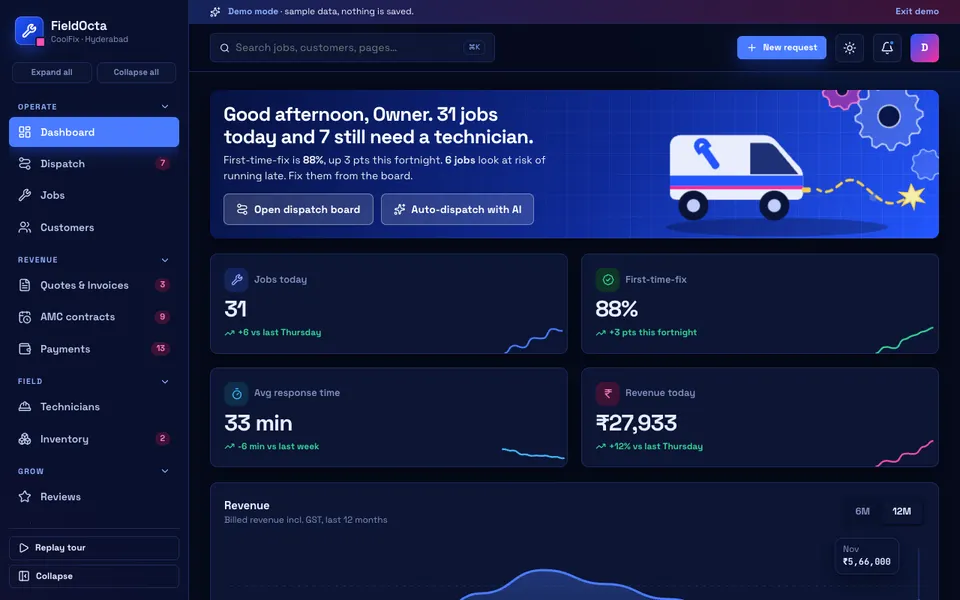
FieldOcta is an interactive Zenocta demo of field-service management for AC and HVAC, appliance repair, solar, plumbing and electrical businesses in India. It uses a sample company with synthetic data. Nothing is saved, the data resets on refresh, and the AI features are scripted simulations, not real models. It shows what a custom system could contain, and it is not a product with real customers.
- Dispatch. Technician lanes against time of day, drag from the queue, travel gaps and overlap warnings.
- Jobs and the job card. A pipeline kanban and a list; the card has a checklist, parts with stock deduction, before and after photo placeholders, a signature pad and payment.
- Customers and Quotes and Invoices. A customer profile drawer, a quote builder with GST and a paper preview, and conversion of a quote to a job.
- AMC contracts. A visit calendar and renewals.
- Technicians, Inventory, Payments and Reviews. Performance, route and a live map; stock; dues and payment links; and customer reviews.
- Dispatch Studio (simulated AI). Auto-dispatch, fault diagnosis, a good, better and best quote generator with a WhatsApp preview, a parts demand predictor, an AMC renewal predictor, a call summary and a review responder.
A few honest limits: photos, WhatsApp messages, payment links and PDF download are placeholders; the dashboard uses a fixed demo clock of 12:15 pm; and HTML drag and drop does not work on touch screens, so each queue card has an Assign menu as the phone fallback.
How to try the FieldOcta demo
- Open fieldocta.zenocta.com.
- On the login screen, choose Try Demo Account.
- Open Dispatch and drag a queued job into a technician's lane. Try an overlapping slot to see the warning.
- Open a job card, tick the checklist and add a part to see stock change.
- Visit Dispatch Studio and run auto-dispatch. A new request or technician update also appears about every 25 seconds, up to five times.
More sample businesses are on the demo apps page.
Having a dispatch system built around your business
Every service business has its own mix of trades, service areas, contract types and customer habits. That is why a generic tool often gets abandoned after a month. Zenocta builds custom software around how you actually work. We begin with a conversation about your jobs today and return a scoped, fixed-price proposal, so there are no surprises later. If you want to explore it, start a conversation about a custom build, or look at the apps Zenocta already runs on Google Play.
If you take bookings from walk-in customers too, our piece on reducing no-shows with booking apps shows a similar scheduling problem. For vehicle-based services, see how a workshop manages job cards and inspections.
Try it live
Open the real thing: demos run in a new tab with sample data, apps link to their own page.
 Live demoFieldOcta live demoOpen a sample service business: dispatch lanes, job cards, quotes, AMC calendar and simulated AI dispatch.
- ABrowse allAll demo appsBrowse every interactive demo, each with a sample company and nothing saved.
- ZBrowse allZenocta appsProduction apps live on Google Play.
- TBrowse allTalk about a custom buildTell us how your business runs and get a scoped, fixed-price proposal.
Frequently asked questions
01What is field service management software?
It is software that handles the work of sending technicians to customers: taking requests, scheduling jobs, recording what was done and used on a job card, quoting, invoicing, collecting payments and tracking recurring contracts such as AMCs.
02How do I stop double booking my technicians?
Use a dispatch board that shows each technician as a lane against time of day, including travel gaps. When you place a job that overlaps another, the board should warn you before you promise the customer a time.
03What should be on a technician's job card?
Customer and equipment details, a checklist for the work, parts used, before and after photos, the customer's signature and the payment status. Recording parts on the card also lets stock be deducted automatically.
04Does the FieldOcta demo use real AI?
No. FieldOcta is an interactive demo with sample data. Nothing is saved, data resets on refresh, and its Dispatch Studio tools, such as auto-dispatch and fault diagnosis, are scripted simulations that show what a custom system could do.
05Can Zenocta build a dispatch system for my business?
Yes. Zenocta builds custom business software. We start with how your jobs run today, then provide a scoped, fixed-price proposal covering the dispatch board, job cards, quotes and any contracts you manage.