In this guide
A print shop sells a different product every hour: 500 visiting cards in the morning, a 20-foot flex banner at noon, a school's stationery order by evening. Each one needs a quote, an artwork file, a proof the customer must approve, a slot on a machine and an invoice. Print shop management software exists to keep those five things connected, so a job does not stall because someone forgot to ask the customer about the proof.
What makes a print shop's day so unpredictable?
Print work is made to order, with a short deadline, and every job has a different path. A digital job may take an hour. An offset job needs plates, make-ready and a press slot. A flex or vinyl job needs a large-format machine and finishing. Some work goes to an outside vendor because you do not own the machine. And almost all of it waits for one thing: customer approval.
The usual tools are a quotation pad, a job bag with the artwork on a pen drive, a whiteboard of press bookings and a WhatsApp thread with the customer. They work until the day it rains orders. Then you meet the common failures:
- A quote is given on the phone, the price is forgotten, and the invoice is a surprise.
- A proof goes out on WhatsApp, the customer says "okay" in a voice note, and a typo is printed 2,000 times.
- Two jobs are promised for the same press on the same afternoon.
- Paper runs out mid-job because nobody saw the stock getting low.
How should you estimate a print job?
An estimate is a small piece of arithmetic that most shops do in their heads. Writing it down in the same shape every time makes quotes consistent and protects your margin. The standard parts are material, machine time, finishing, wastage and margin.
Here is a sample estimate with made-up numbers: 1,000 A5 flyers printed four to a sheet.
| Line | Working | Sample amount |
|---|---|---|
| Sheets needed | 1,000 flyers / 4 per sheet | 250 sheets |
| Wastage allowance | 10% extra for make-ready and spoilage | 275 sheets |
| Paper | 275 sheets x ₹6 | ₹1,650 |
| Machine time | 0.5 hour x ₹1,200 per hour | ₹600 |
| Finishing | Cutting and packing | ₹300 |
| Cost | Sum of the above | ₹2,550 |
| Margin | 25% on cost | ₹638 |
| Quote before tax | Cost plus margin | ₹3,188 |
Tax is added on top according to the current rules, so confirm with your accountant. The useful part is the wastage line: shops that skip it quote as if every sheet comes out perfect, and quietly pay for the spoilage themselves. A good estimator also turns an accepted quote into an order in one step, so the price on the invoice is the price you quoted.
Tip
After each month, compare estimated wastage against actual wastage for your three most common jobs. If you consistently use 14 percent and quote 10, you have found money you are losing on every order.
Why do proof approvals cause so many reprints?
A proof is the customer's last chance to catch a mistake. It is also your protection: once approved, a typo is the customer's responsibility. Both only work if the approval is recorded where the whole shop can see it.
A reliable proof flow
- Attach the proof to the job. Not to a chat. The job should show which version is current.
- Send it for approval with a clear request. Ask the customer to check spelling, phone numbers, colours and sizes.
- Record the response. Approved, changes requested, or no reply, each with a date.
- Block the press. A job should not reach the machine until the proof status says approved.
- Chase the silent ones. A list of jobs waiting on proofs, by age, is more useful than any reminder you remember to send.
The reminder step is easy to automate, and it is worth doing in the customer's language. A short reminder in English, Hindi or Telugu gets a faster reply than a formal message.
How do you plan the queue across presses?
Think of each machine as a lane. A job is a card that sits in the lane of the press that will print it. Seeing every press as a lane shows what a whiteboard cannot: how many hours are booked on each machine each day, and where two jobs clash.
Three signals make the queue useful. First, hours per day on each lane, so overload is visible as a number and not as a feeling. Second, a clash warning when two jobs overlap on one machine. Third, a way to move a job to another lane with one action when a machine goes down. If a digital press fails at 11 am, you want to see in seconds which jobs can shift to the other machine and which will miss their date.
What about materials, outsourcing, delivery and billing?
Material and stock
Paper, vinyl, flex, plates and ink all run out at the worst time. Keep a stock list with a low-level mark for each item, and let jobs draw down the stock they use. The dashboard should show "material low" before the job that needs it reaches the press.
Outsourcing
Lamination, die cutting, binding or large-format work often goes to another vendor. Treat an outsourced job like an internal lane: it leaves on a date, comes back on a date, and costs a known amount. Otherwise "sent out" becomes a black hole.
Delivery and billing
A delivery challan should list what left the shop and be linked to the job. The invoice should come from the same record, with the advance already deducted. For regular customers, an ageing view of outstanding payments is the difference between collecting on time and chasing for months. Check the current tax rules for how your invoices must be raised.
Notepad, spreadsheet or print management software?
| Approach | Strength | Weak point |
|---|---|---|
| Quotation pad and job bag | Fast, no training | No history, no machine view, proofs are informal |
| Spreadsheet | Good for a price list and a simple order log | Does not show press load, proof status or stock together |
| Print management software | Estimate, order, proof, press, stock and invoice connected | Needs setup, and should match how your shop prices and plans |
How to set up print shop software without disrupting orders
- Write your price rules down. Paper cost, machine rate per hour, finishing charges, wastage and margin. The software needs rules to follow.
- List your machines and their capacity. Include outside vendors as lanes.
- Load your regular customers first. New ones can be added as they order.
- Run new orders through it from a set date. Do not retype old jobs; finish them on paper.
- Make proofs mandatory before press. This one rule prevents most reprints.
- Add stock and billing once the queue is stable.
Questions to ask any vendor
- Can I set machine rates, wastage and margin rules and see the working on every quote?
- Does an accepted quote become a job without retyping?
- Can I record proof approval and block printing until it is approved?
- Does the queue show hours per day per press and warn me about clashes?
- Can I track outsourced work by vendor and due date?
- Can the shop floor use it on a tablet or phone?
- Can I export my customer list and job history?
Common mistakes
- Quoting without wastage. Spoilage is real cost; hide it and you pay it.
- Accepting approvals over chat only. If it is not on the job record, it did not happen.
- Planning by machine name, not by hours. A press with six jobs is not overloaded; a press with 14 booked hours in a 9-hour day is.
What the PrintOcta demo shows
We built PrintOcta as an interactive demo for digital, offset, flex, vinyl and stationery shops. It sits with the others on our demo apps page. The sample shop has these numbers:
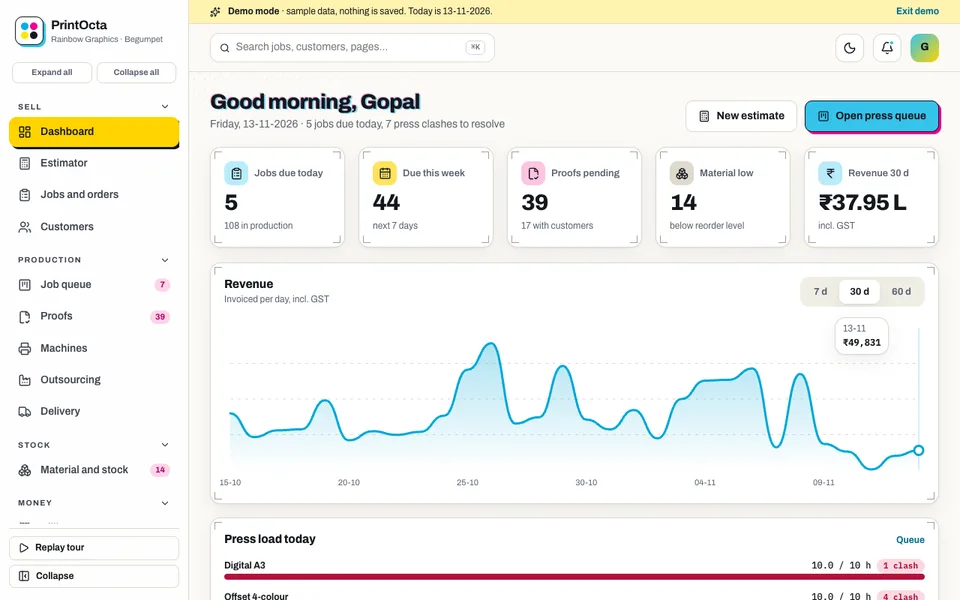
- Dashboard: jobs today, due this week, proofs pending, material low, revenue and press load, with a live feed.
- Estimator: a specification, then machine time plus material plus wastage plus margin, and quote to order.
- Jobs and orders: job bag, files placeholder, delivery date and advance.
- Job queue by press: one lane per machine, drag a job or use the select on touch, a proof-approval modal with drawn artwork, and clash and overload highlights with hours per day.
- Proofs, material and stock, machines, outsourcing, delivery challans: the supporting pages from the sections above.
- Billing: GST invoices, advances, credit, ageing and statements.
- Customers, reports, team and shifts, settings.
- Press Studio: seven tabs of simulated AI: instant quote, artwork pre-flight, imposition, schedule optimiser, proof reminders in English, Hindi and Telugu, colour and paper recommender and wastage predictor.
Be aware of what the demo is: the shop is fictional, the data is sample data, nothing you enter is saved, everything resets when you refresh, and the Press Studio tools and customer approval links are simulated. It runs in the browser with desktop, tablet and phone layouts.
How to try it
Open the demo and choose Try Demo Account on the login screen. Open the Job queue, drag a job to another press and watch the hours per day change. Then open a proof to see the approval modal.
Getting a print management system built for your shop
Every shop prices a little differently, and your rate card, finishing options and approval habits should shape the software. To get something like this for your business, ask Zenocta for a custom build. We will look at your price rules, machines and proof process and send a scoped, fixed-price proposal. Zenocta is a Hyderabad studio, and you can see what we ship in our apps. For related reading, see GST billing software for small business and production management software for manufacturers.
Try it live
Open the real thing: demos run in a new tab with sample data, apps link to their own page.
 Live demoPrintOcta live demoBuild an estimate, drag jobs between presses and open a proof-approval screen, all on sample data.
- ABrowse allAll demo appsInteractive demos for dozens of industries, no sign-up needed.
- ZBrowse allZenocta appsProduction apps live on Google Play.
- TBrowse allTalk about a custom buildShare your rate card and machines and get a scoped, fixed-price proposal.
Frequently asked questions
01How do I estimate a print job accurately?
Add material, machine time and finishing, include a wastage allowance for make-ready and spoilage, then apply your margin. Writing it in the same layout every time keeps quotes consistent and shows where your real costs differ from your estimates.
02Why does proof approval matter so much?
Once a customer approves a proof, errors that were visible on it become the customer's responsibility. Recording approval on the job, with a date, protects you from reprints and disputes, and lets you block printing until approval arrives.
03How can software help schedule presses?
It shows each machine as a lane with the hours booked per day, warns when jobs clash or a machine is overloaded, and lets you move a job to another lane in one action when a press is down.
04Is PrintOcta something I can subscribe to?
No. PrintOcta is an interactive demo with sample data for a fictional shop. Nothing is saved, data resets on refresh, and the AI tools and customer approval links are simulated. It demonstrates what Zenocta can build.
05How do I get print shop software built for me?
Contact Zenocta with your rate card, machines and how you handle proofs. We will review them and send a scoped, fixed-price proposal for a custom build that follows your shop's way of working.