In this guide
A customer wants a 4 PM appointment on Saturday. She calls, nobody picks up because the stylist has her hands full, and she books with someone else who has a booking link. That lost booking never shows up in any report. This guide is about the front door of a service business: an online booking page for small service businesses, and the waitlist and reminders that keep the calendar full once it is open.
What goes wrong when bookings run on calls and chats?
Salons, clinics, tutors, studios and spas share one awkward fact: the product is a slot of someone's time, and an unsold slot cannot be sold tomorrow. Handling bookings by phone and chat creates a familiar set of leaks.
- Missed calls are missed bookings. The person who answers is also the person doing the work.
- Double bookings. Two staff members promise the same hour to two people because the diary is a notebook and a phone.
- Back-and-forth messages. "Is 5 PM free?" "No, how about 6?" That exchange can take a day to settle.
- Cancellations that go unfilled. A customer cancels at noon for a 2 PM slot, and nobody has time to find a replacement.
- No-shows. A reminder was promised but never sent because it depended on someone remembering.
A public booking page does not replace your front desk. It takes the repetitive part, checking availability and confirming a slot, off the people who should be serving customers.
How does a booking page decide which slots to show?
This is the part that separates a useful booking page from a form that emails you. A booking page has to know the rules of your calendar and offer only slots that are genuinely free. Five inputs do most of the work.
- Service duration. A haircut takes 45 minutes, a consultation 15, a tuition demo class 30.
- Buffer time. A gap after the service for cleaning, notes or travel between rooms.
- Staff working hours and breaks. Including time off, which must remove slots without anyone editing them by hand.
- Who can do what. Not every staff member offers every service.
- Lead time and cancellation window. For example, no bookings less than 2 hours ahead, and changes allowed until a set point.
Here is a small made-up example. A stylist works 10:00 to 18:00 with a lunch break from 13:00 to 14:00. A service takes 45 minutes and you add a 15 minute buffer, so each booking occupies 60 minutes. The day has 8 hours minus the 1 hour break, which is 7 hours, so the page can offer 7 start times: 10:00, 11:00, 12:00, 14:00, 15:00, 16:00 and 17:00. The 12:00 slot finishes at 13:00, exactly when the break begins, so it is safe. If you had forgotten the buffer, you would have sold 9 slots of 45 minutes in a day that really fits 7 comfortable ones, and every customer after the first would wait.
Tip
Test the page as a customer on a phone before you share the link. Most bookings arrive from a phone, and a calendar widget that is awkward at that size quietly sends people back to calling.
One booking page, three businesses: what changes?
Salons and spas
Services often need a specific person and sometimes more than one resource: a stylist plus a basin plus a colour station. Add-ons stretch the duration, so the page should recalculate the end time when a customer ticks an extra. For a deeper look at salon money and no-shows, see our guide to cutting salon no-shows.
Clinics
Slots are short and tightly packed, so buffer and lead time matter. The booking page should collect only what is needed to confirm the visit, such as name, phone and reason category, and leave the clinical side to your own records. We cover the broader system in our clinic software checklist. Nothing in a booking page is medical advice, and any health data you collect should be handled under the current rules for your area.
Tutors and coaches
Here the same slot often repeats weekly, and sessions may be sold as a package of ten. The booking page then needs packages and a way to show remaining sessions. For fees and batches, see software for tutors.
How does a waitlist turn cancellations into revenue?
A waitlist is a list of customers who want a slot that is not currently free. When a slot opens, the system offers it, rather than leaving the gap for someone to notice.
The fair way to run it is sequential offers with a short countdown. Take a made-up case. A 2 PM slot is cancelled at 12:00. Three people are on the waitlist for that day. The first receives an offer and has 10 minutes to accept. If she does not respond, the offer moves to the second, and then the third. In the worst case the slot is resolved by 12:30, which still leaves an hour and a half to spare. If each slot is worth ₹800 (an illustrative price) and the waitlist fills just 4 gaps a week, that is ₹3,200 a week from slots that would otherwise sit empty.
The countdown matters. Without it, an offer sits unanswered while the clock runs down and the slot is still lost. Make the wait short enough to be useful and long enough to be fair.
What reminders should you send, and when?
A reminder is cheap, and a no-show is not. A simple timeline works for most small service businesses: a confirmation at booking, a reminder the day before, a short one a couple of hours before, and a polite follow-up if the customer does not turn up. Keep each message short, include the time, place and a way to reschedule.
Tone depends on the customer. Many businesses message in English and in a local language, so a writing helper that adapts the same reminder into a friendlier or a more formal version is a time-saver. Treat any such helper as a drafting aid, and read a message before sending it.
How do you roll out online booking without losing regulars?
- List your services with real durations. Time yourself for a week. Guessed durations create overruns.
- Enter staff hours, breaks and time off. Include who can perform which service.
- Set buffers, lead time and the cancellation window. Choose rules you will actually enforce.
- Share the booking link where customers already are. Your WhatsApp status, social profile and the front desk.
- Keep taking phone bookings, but enter them in the same calendar. One diary, always.
- Turn on the waitlist and reminders after a week. Once the calendar is trusted, automate the follow-up.
Spreadsheet, paper or purpose-built software?
| Need | Paper diary | Spreadsheet or shared calendar | Purpose-built booking software |
|---|---|---|---|
| Customer self-booking | Not possible | Possible with forms, manual checks | Public page showing only free slots |
| Conflict and buffer checks | By eye | Partial | Checked when a booking is made or moved |
| Filling cancellations | Phone calls when time allows | A list of names | Waitlist with timed offers |
| Reminders | Whoever remembers | Manual messages | Scheduled before each visit |
| Staff schedules | Wall chart | Separate sheet | Hours, breaks and time off drive availability |
What to ask any vendor or developer
- Does availability account for buffers, breaks and time off automatically?
- Can I move a booking without creating a conflict, and on a phone too?
- Can the waitlist send timed offers in order?
- Can reminders go out at several points before the visit?
- Can I build a simple page for my business, with services and a booking button?
- Are packages and memberships supported where I sell them?
- Can I export my customer list at any time?
Common mistakes
Offering too many slots is one: showing every five minutes makes a calendar look chaotic and fragments your day. Another is skipping lead time, which lets someone book a slot starting in ten minutes. A third is running two diaries, a paper one and a digital one, which sooner or later produces a double booking.
What the BookOcta demo shows
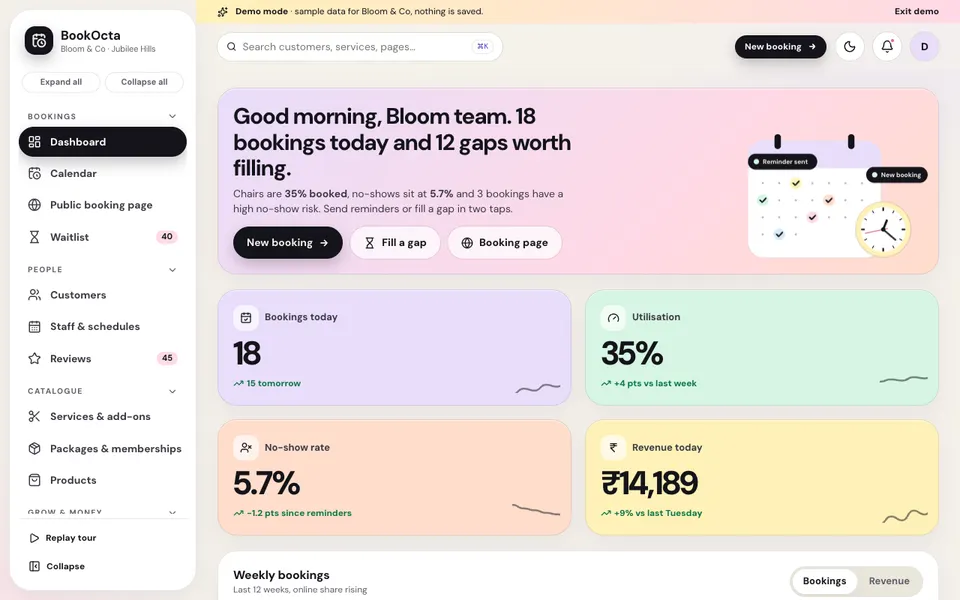
BookOcta is an interactive Zenocta demo for appointment-based businesses such as salons, spas, clinics, tutors and studios, built around a fictional studio called Bloom and Co in Jubilee Hills, Hyderabad. It uses sample data, nothing is saved and any sign-in works. All the "AI" is simulated and scripted, and payments, WhatsApp and SMS are simulated too.
- Bookings: a Dashboard; a Calendar in day and week views with staff columns, drag and resize with conflict and buffer checks, and click-an-empty-slot to book; a Public booking page shown on desktop and in a phone mockup, with a working flow that creates a booking; and a Waitlist that works as a gap filler with offer countdowns.
- People: Customers with a profile drawer, Staff and schedules (hours, breaks, time off and commission) and Reviews.
- Catalogue: Services and add-ons, Packages and memberships, and Products.
- Grow and money: Reminders and campaigns with a reminder and no-show timeline, a Mini-website builder, Coupons and referrals, and Payments and invoices.
- Insights: Analytics in four tabs (Overview, Utilisation, Customers and Revenue), the Book Studio and Settings.
The Book Studio holds seven scripted tools: a smart gap filler, a no-show predictor, a message writer in English, Hindi and Telugu with three tones, an upsell finder, a WhatsApp booking bot, a demand forecast with rota changes, and a review reply and site-copy writer. The demo clock is held between 10:30 am and 5:30 pm so the "now" line is always visible, and on phones you reschedule from the booking dialog instead of dragging.
How to try it
Open the demo and choose Try Demo Account on the login screen. Start at the Public booking page and make a booking as a customer, then find it in the Calendar. Cancel one, and watch the Waitlist offer the slot. More demos are listed on the demo apps page.
Getting a booking system built for your business
A salon chain, a physiotherapy centre and a group of home tutors need different rules, so a generic booking tool often forces you to bend your business to it. Zenocta builds custom software around your services and schedule: we begin with how your day runs and return a scoped, fixed-price proposal. You can talk to us about a custom build, or browse the apps we have already shipped on the apps page.
Try it live
Open the real thing: demos run in a new tab with sample data, apps link to their own page.
 Live demoBookOcta live demoOpen a sample studio: staff calendar, a working public booking page, waitlist, reminders and a mini-website builder.
- ABrowse allAll demo appsBrowse every interactive demo, each with a sample company and nothing saved.
- ZBrowse allZenocta appsProduction apps live on Google Play.
- TBrowse allTalk about a custom buildTell us how your bookings work and get a scoped, fixed-price proposal.
Frequently asked questions
01How does an online booking page avoid double bookings?
It checks every requested slot against staff hours, breaks, time off, existing bookings and buffers before offering it. A slot that clashes is never shown, so two customers cannot take the same time.
02What is a booking buffer and do I need one?
A buffer is a gap added after a service for cleaning, notes or moving between rooms. Most businesses need one, because without it appointments run into each other and every later customer waits.
03How does a waitlist work when someone cancels?
When a slot opens, the system offers it to waitlisted customers one at a time, each with a short countdown to accept. If one declines or does not reply, the offer moves to the next person in order.
04When should reminders be sent?
A common pattern is a confirmation at booking, a reminder the day before and a short one a few hours ahead. Keep each message brief and include the time, the place and a way to reschedule.
05Can Zenocta build a custom booking system?
Yes. Zenocta builds custom booking and scheduling software around your services and staff. We return a scoped, fixed-price proposal. The BookOcta demo uses sample data and simulated messaging and is not a product for sale.