In this guide
Ask a PG owner how many beds are empty right now and you often get an estimate. Ask who has not paid this month and the answer lives in a notebook, a phone gallery of UPI screenshots and the warden's memory. This guide is about hostel and PG management software built around the physical building: a bed floor plan, rent dues, the mess, complaints and visitors, and how to operate a property from one screen.
Where does a hostel or PG lose money without anyone noticing?
A hostel looks simple from outside: rooms, beds, monthly rent. Inside, it is a small town with several moving parts, and each one leaks quietly.
- Vacancy you cannot see. A resident gives notice, nobody tells the enquiry desk, and the bed sits empty for three weeks.
- Rent chased by memory. Partial payments, advance payments and late fees are tracked in different places, so dues are argued, not shown.
- Complaints with no clock. A leaking tap is reported on Monday, and by Friday nobody knows who owns it.
- Mess cooked for the wrong number. Residents travel, guests eat, and the cook plans from habit.
- Visitors and gate entries on loose paper. Fine until something goes missing and nobody can say who came in.
- Deposits settled from memory. A damage claim and an old dues amount get combined into a number that neither side trusts.
Our earlier post on PG and hostel management software covers one finished Zenocta app for owners. This article takes a different angle: how to operate a hostel day to day, starting from the plan of the building.
Why start with a bed floor plan?
Most software starts from a resident list. A hostel actually starts from a bed. The resident is only one attribute of that bed. A floor plan draws each room as a block and each bed as a tile coloured by status, so the owner sees the state of the whole property without reading a table.
Five statuses cover almost every case: occupied, vacant, on notice (the resident has said they will leave), reserved (someone has booked but not arrived) and under maintenance. The status that earns the most money is "on notice". It tells you a bed will free up on a known date, so you can sell it before it is empty.
Here is a made-up 30-bed property. Twenty-four beds are occupied, 2 are on notice, 1 is reserved, 1 is under maintenance and 2 are vacant. That adds up to 30. Current occupancy is 24 of 30, which is 80%. If both notice residents leave and the reserved person arrives, occupied beds become 24 minus 2 plus 1, which is 23, or about 76.7%. Knowing that number a month ahead tells you whether to advertise now.
A plan also helps when residents change rooms. Dragging a resident onto a vacant bed, with a confirmation step, is faster and safer than editing three records by hand. It should also give you a way to do the same on a touch screen, because the warden is rarely at a desk.
How do rent dues stay clear and fair?
Rent in a hostel is monthly, but real life is not. People pay half now and half later, pay for two months at once, or pay after a reminder. A rent roll is a list of every resident with what is due, what has been paid and what is outstanding. Everything else, from reminders to late fees, works from that list.
A short, made-up example: 24 residents each owe ₹7,000, so ₹1,68,000 is due. By the 10th you have collected ₹1,50,500. Outstanding is ₹17,500 (168,000 minus 150,500). If your policy charges a late fee of ₹50 per day after the due date, a resident six days late owes ₹300 extra. These numbers are illustrative; the point is that the system should do this arithmetic from your own policy so that every resident is treated the same way.
Good rent features are mostly small: partial payments recorded against the right month, a receipt generated at payment, and reminders sent to the resident at the right time. A reminder with a clear amount and a payment link gets a faster response than a general message in a group.
Tip
Write your late-fee and notice policies in plain words before you configure anything. Software can apply a rule consistently, but it cannot decide a rule for you, and residents accept a rule they were shown at check-in far more easily than one invented at the due date.
What should check-in and check-out capture?
Check-in is where trouble is prevented. A short checklist at arrival should record the resident's details, guardian contact, agreement, deposit received and the condition of the room and its inventory: bed, mattress, cupboard, fan, light. Taking identity documents also needs care. Mask what is displayed, limit who can see it, and check the current rules for storing and handling identity data.
Check-out is where money is settled. Take a made-up deposit of ₹14,000. The room inspection finds damage worth ₹1,500, and the resident has ₹3,000 of unpaid dues. Refund is 14,000 minus 1,500 minus 3,000, which is ₹9,500. When the deductions are itemised against a checklist you both saw at check-in, the conversation takes minutes. When they are remembered, it takes an afternoon and a bad review.
How do mess, complaints and visitors fit in?
Mess
A mess is a daily headcount problem. The number to cook for is residents who are present, minus those on leave, plus guests who ordered. Tracking meal-wise attendance, even roughly, stops over-cooking and lets you spot a menu that nobody finishes.
Complaints
Treat complaints as tickets, not conversations. Each has a category, an owner, a deadline and a status on a board: new, assigned, in progress, resolved. A service level, such as "plumbing within 24 hours", makes lateness visible. If you use outside vendors for electrical or plumbing work, record which vendor attended and how long it took.
Visitors and notices
A gate log with name, whom they visited, time in and time out is simple and useful. Add a notice board for events, rules and maintenance windows, so announcements are not lost in a group chat.
How do you roll out a hostel system without a chaotic month?
- Draw your building first. Properties, floors, rooms and beds, with a true status for each. This single step reveals most of your data errors.
- Load residents onto their beds. Include rent, deposit, joining date and guardian contact.
- Build this month's rent roll. Enter what each person has already paid, so the opening balance is correct.
- Move complaints onto the board. Ask residents and staff to raise new issues there from a set date.
- Add the gate log and mess headcount. These are quick wins for the warden.
- Review notice and vacancy weekly. Make it a fixed meeting, so the plan is used, not just maintained.
Spreadsheet, paper or purpose-built software?
| Need | Paper register | Spreadsheet | Purpose-built software |
|---|---|---|---|
| See empty and upcoming beds | Walk the floors | A list by room | Floor plan with status per bed |
| Rent dues and partial payments | Notebook | One row per resident, easy to overwrite | Rent roll with receipts and reminders |
| Complaints and deadlines | Verbal | A log nobody reviews | Board with owners and service levels |
| Deposit settlement | Calculated at the door | Manual formula | Itemised against the check-in record |
| Visitors | Gate register | Rarely kept | Searchable gate log |
What to ask any vendor or developer
- Is there a visual plan of rooms and beds, and can I shift a resident from it?
- Does the system show beds on notice, so I can sell them early?
- Does the rent roll handle partial payments, advances and late fees from my own policy?
- Can the warden, the accountant and a resident each see only what they should?
- Are identity details masked and access controlled?
- Can I handle several properties from one login?
- Who owns the data, and can I export it?
Common mistakes
The most common is loading resident data before the building is right, which produces residents in beds that do not exist. Another is unclear notice policy: if residents do not know how much notice to give, "on notice" is never recorded. A third is giving everyone full access. A resident does not need to see another resident's dues, and a warden does not usually need the profit and loss view.
What the HostelOcta demo shows
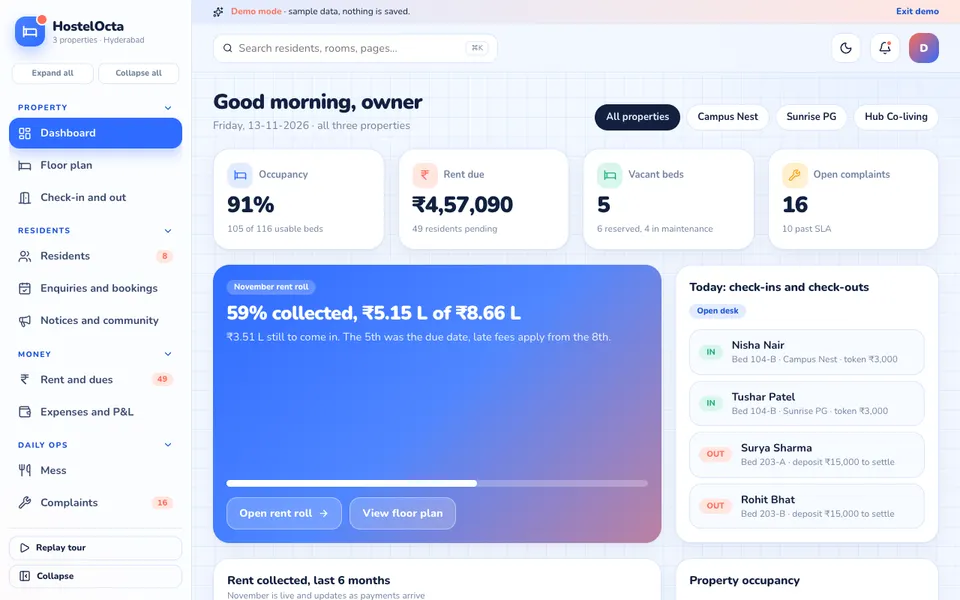
HostelOcta is an interactive Zenocta demo for hostels, PGs and co-living operators in India. It runs on sample data, nothing is saved and it resets when you refresh. Everything labelled AI is simulated and deterministic, not a real model.
- Floor plan: the signature view. Per property and floor, rooms are drawn as plan blocks, with beds as tiles coloured as occupied, vacant, notice, reserved or maintenance. Click a bed for the resident and rent, and drag a resident onto a vacant bed to shift them, with a confirmation. A Shift select works on touch screens.
- Residents: masked identity details, guardian, agreement and deposit.
- Check-in and out: checklists, inventory and deposit settlement.
- Rent and dues: a rent roll, partial payments, late fee, UPI receipts and WhatsApp reminders (simulated).
- Operations: Mess; Complaints as a kanban with service levels and vendors; Visitors and a gate log; and Notices and events.
- Business: Expenses and profit and loss, Enquiries and bookings, Reports and Settings.
The Stay Studio holds seven simulated tools: a roommate matcher, a rent-default predictor, a pricing optimiser, a mess forecaster, complaint triage, a listing writer and a resident chatbot in English, Hindi and Telugu. The demo also has role switching (Owner, Warden, Accountant, Resident), a command palette (Ctrl or Cmd plus K), a live event ticker and a light and dark theme.
How to try it
Open the demo and choose Try Demo Account on the login screen, then take the short tour or skip it. Open the Floor plan, click a bed on notice, and shift a resident to a vacant bed. Then switch role from the account menu to see how the Resident view differs from the Owner view. The demo apps page lists the other industry demos.
Getting a hostel system built around your property
A boys' hostel near a college, a co-living brand with many sites and a single-building PG need different workflows, from mess rules to visitor policies. Zenocta builds custom software for small businesses: we start by walking through how your property runs and return a scoped, fixed-price proposal. You can talk to us about a custom build, or see the production apps we have shipped on the apps page. If you also manage a residential block, read our guide to apartment maintenance software.
Try it live
Open the real thing: demos run in a new tab with sample data, apps link to their own page.
 Live demoHostelOcta live demoOpen a sample hostel group: bed floor plan, rent dues, mess, complaints board, visitors and a simulated Stay Studio.
- ABrowse allAll demo appsBrowse every interactive demo, each with a sample company and nothing saved.
- ZBrowse allZenocta appsProduction apps live on Google Play.
- TBrowse allTalk about a custom buildTell us how your hostel runs and get a scoped, fixed-price proposal.
Frequently asked questions
01What is a bed floor plan in hostel software?
It is a visual layout of each floor, with every room drawn as a block and every bed as a tile coloured by status, such as occupied, vacant, on notice, reserved or under maintenance. It shows the whole property without reading a table.
02How should a hostel track partial rent payments?
Record each payment against the month it covers and keep a rent roll showing due, paid and outstanding per resident. Late fees should then be calculated from your written policy so every resident is treated the same way.
03Why track beds that are on notice?
A bed on notice will become vacant on a known date. Seeing it early lets the enquiry desk reserve it for a new resident, so the bed does not sit empty between one stay ending and the next beginning.
04Is identity data safe to store in hostel software?
Identity documents are sensitive. Mask what is displayed, restrict who can open it, and check the current rules for storing and handling identity data. The HostelOcta demo only shows masked sample data.
05Can Zenocta build a custom hostel or PG management system?
Yes. Zenocta builds custom software around how your property runs, from bed plans to rent and mess. We return a scoped, fixed-price proposal. The HostelOcta demo uses fictional data and is not a product for sale.