In this guide
A buyer researching a car or an electric scooter has usually decided on a shortlist before they ever phone a dealer. They compare shapes, colours, running costs and monthly payments on a phone, then book a test drive for the one or two they still like. A car showroom website has to support that whole journey, from "what is on offer" to "which one fits my budget" to "when can I drive it", and it has to do so on a small screen.
What do people do on a car or two-wheeler showroom website?
Visitors arrive with different jobs, and each job needs a page that is easy to reach:
- Browse the range. They want to see every model, its body type and fuel, and a starting price, without opening five tabs.
- Compare two or three models. A side-by-side table of key specifications saves a phone call.
- Imagine owning one. Colours, wheels and trims are emotional choices. Seeing them changes the way a buyer talks about the vehicle.
- Work out the cost. Monthly payment, and for electric vehicles, running cost and charging, often decide the purchase.
- Book a test drive or ride. This is the conversion that matters. Everything else exists to get a buyer to this step.
- Check after-sales. Service plans, warranty and where the workshop is located reassure buyers who worry about ownership.
People leave when specifications are buried in a PDF, when a price is hidden behind a form, when the configurator is slow, or when the test-drive form asks for more than a name, a phone number and a preferred time.
What is the right page map for a showroom website?
Keep the structure shallow. A buyer should reach any model in one tap from the home page and the test-drive form in one tap from any page.
| Page | Purpose | Key elements |
|---|---|---|
| Home | Show the range and the next step | Hero vehicle, model cards, "Book a test drive" in the header, one line on what makes the brand different |
| Model range | Let buyers scan everything | Cards with body type, fuel or battery, starting price; filters by type and budget |
| Model detail | Answer every question about one vehicle | Gallery, key specifications, variants, colours, features, price and what it covers, test-drive button |
| Configure | Make the choice personal | Colour, wheels, trim and packs with a running price estimate |
| Compare | Settle the shortlist | Two or three models in a specification table with differences highlighted |
| Finance and cost tools | Make the price feel real | EMI estimator, running-cost comparison, range calculator for EVs |
| Test drive or ride | Capture the lead | Short form, location, date and time, confirmation message |
| Dealers and service | Reduce ownership worry | Showroom and workshop locations, service plans, warranty summary |
| Pre-owned (if you sell it) | Move used stock | Listings with photographs, history notes and an inspection summary |
| FAQ, journal, contact | Support and search | Plain answers, helpful articles, phone and WhatsApp |
What should every model page contain?
The model page is where buyers decide whether to call. Treat it as a short brochure that can be read in under a minute:
- A clear gallery with the exterior from several angles and the interior, in photographs you own the rights to.
- Five to eight key specifications in a compact table, written the same way on every model so comparisons are fair.
- Variants and colours, with the price for each variant and a note on what is and is not included.
- A short list of features in plain language, grouped by comfort, safety and technology.
- A test-drive button that stays visible as the page scrolls on a phone.
Use the same field names, units and order on every model. If one page says "boot space" and another says "luggage capacity", visitors cannot compare and your own team cannot maintain the site.
How do configurators, comparison and finance tools earn their place?
Interactive tools are the part of a showroom site that visitors remember, but only if they stay simple. Each tool should answer one question.
- Configurator: "What would mine look like?" Offer colour, wheels, trim and a few packs, and show the running price. Do not hide the base price.
- Comparison: "Which of these two is right?" A table, not a chart, with the rows that buyers actually ask about.
- EMI estimator: "What would I pay each month?" Label it as illustrative, let the visitor change the down payment and term, and leave rates and approval to the lender. Never present it as an offer.
- Running-cost comparison (EVs): "What does it cost per month?" Show the inputs so visitors can use their own prices.
- Range calculator (EVs): "Will it cover my trip?" State the assumptions: speed, load, terrain and conditions.
Here is how a running-cost comparison can work. The inputs below are invented for illustration and are not a claim about any vehicle. A real tool should let the visitor type in their own numbers.
| Input (made up) | Electric scooter | Petrol scooter |
|---|---|---|
| Energy price | ₹8 per unit of electricity | ₹100 per litre of petrol |
| Energy used per 100 km | 4 units | 2 litres |
| Cost per 100 km | 4 x ₹8 = ₹32 | 2 x ₹100 = ₹200 |
| Cost for 1,000 km a month | 10 x ₹32 = ₹320 | 10 x ₹200 = ₹2,000 |
The point is not the figures. It is that the visitor can see the working. For a deeper look at the same idea, read how to track EV running cost and charging.
Tip
If you mention subsidies, incentives or tax benefits on an EV site, link to the official source and write "check the current rules". They change, and a wrong figure on your website is your responsibility.
How should the test-drive and enquiry flow work?
This is the heart of the site, so design it deliberately. A good flow has five moves, and each one should take seconds:
- Start from anywhere. A "Book a test drive" button in the header and on every model page, pre-selecting the model the visitor was reading.
- Ask for the minimum. Name, phone number, city or showroom, preferred date and time. Make everything else optional.
- Offer real choices. Show only the showrooms and time slots you can actually serve, and a clear note for home test drives if you offer them.
- Confirm instantly. Show a summary on screen and send a message, so the visitor knows it worked. State what happens next and who will call.
- Route and follow up. Send each request to the right showroom with the model and time, and track whether it became a visit and a sale.
Offer a phone number and WhatsApp beside the form for visitors who prefer a person. If your workshop also takes bookings, our guide to online car service booking shows what that flow needs, and the online booking page guide covers reminders and waitlists.
What content should you prepare before design starts?
- A model list with body type, fuel or battery type, variants and starting prices you are authorised to publish.
- Specification sheets in one consistent format, with units, and the conditions behind any range or efficiency figure.
- Photographs and, if you plan a 3D view, accurate colour and trim names from the manufacturer or brand.
- A list of showrooms and workshops with addresses, phone numbers and opening hours.
- Service plan and warranty summaries in plain language, with the terms linked.
- Finance partners' names only if you have permission, and the wording they require beside any calculator.
- Any disclaimers your business must show on prices, offers and specifications. Check the current rules for your area.
How can 3D and motion help or hurt a showroom?
Vehicles are physical, glossy and detailed, so 3D suits them better than most products. A turning car with reflections, a colour change that updates the paint instantly, or a scooter that comes apart to show the battery makes a showroom visit possible from the sofa.
The costs are real. A reflective 3D vehicle asks a lot of a phone, so test on a modest handset and offer a lighter version, such as a still image or a simple spin of pre-rendered frames. Keep the price, the specifications and the test-drive button in plain page text, not inside the scene. Honour reduced-motion settings, and never block scrolling or the buttons while a scene loads. If the 3D is slow, buyers do not blame the scene, they blame the dealer. Our note on website speed and customer experience explains why.
Mobile-first notes for a showroom
- Test drive within thumb reach. Keep the booking button in the header and as a sticky bar on model pages, at least 44px tall.
- Swipeable galleries and cards. A horizontal rail suits model cards, but give a "view all" link for those who prefer a list.
- Compare as a table that scrolls sideways within its own frame, not as a layout that forces the whole page to scroll sideways.
- Sliders and calculators with large handles, sensible defaults and number fields that open the numeric keyboard.
- Forms with inputs at 16px, which avoids zoom-on-focus, and a phone field that uses the telephone keyboard.
- No hover-only information. Anything revealed on hover on desktop needs a tap equivalent on touch screens.
Basic search visibility for dealers and EV brands
Buyers search for specific models and for local showrooms. You cannot promise a ranking, but you can make each page easy to understand: one page per model with a clear title and h1, descriptive image alt text, a showroom page for each location with the same name, address and phone number everywhere, and a small FAQ answering the questions your sales team hears most. Keep pages light by loading heavy 3D only when it is needed. The wider case is in why every business needs a modern website.
The automotive demos
These two working demos are for fictional businesses. Their models, prices and forms are samples and nothing can be bought or booked.
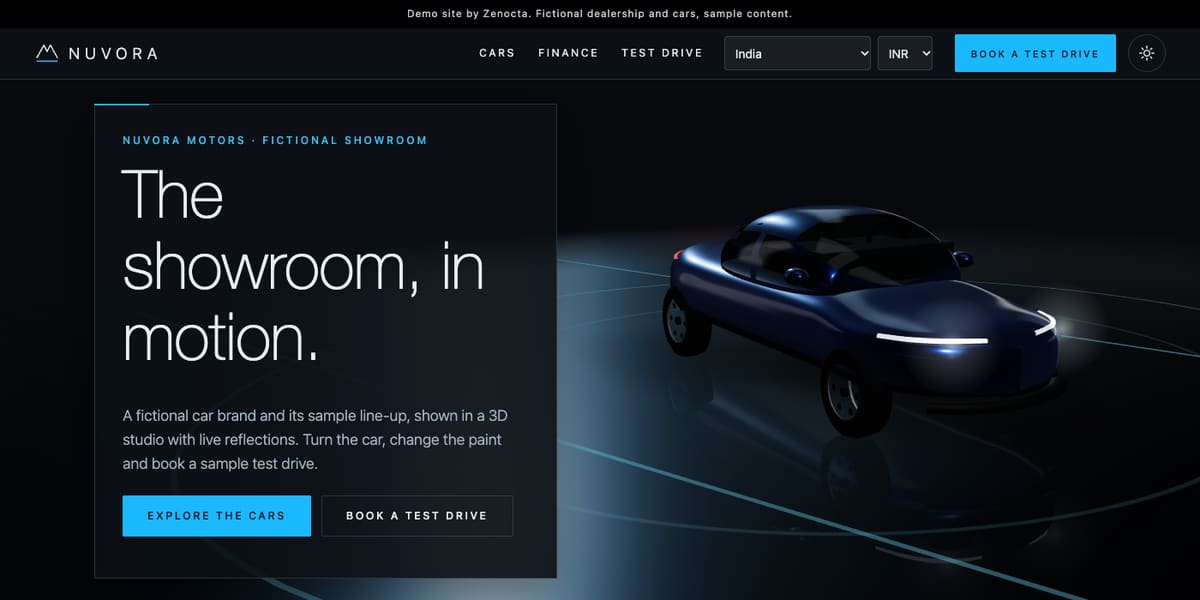
Nuvora Motors: a car showroom in a 3D studio
A turning 3D car sits in a studio with live reflections, and the story moves through exterior, wheels, lights, tail, interior and a view from above. Six sample models, from hatchback to pickup across petrol, hybrid, diesel and electric, each have a detail page. Around them are a paint, wheel, trim and pack configurator, a side-by-side comparison, a 360 spin, an illustrative EMI tool, a test-drive form, sample pre-owned listings, a dealer map, service plans and accessories. A country and currency selector sits in the header. Open the Nuvora Motors demo.
Ampwing Electric: an electric two-wheeler brand
As you scroll, an electric scooter comes apart panel by panel to show the battery pack, individual cells, the hub motor and the controller, then goes back together and rides away. Nine sample models, five scooters and four motorcycles, have their own pages. There is a compare tool, a colour and finish studio, pages on charging, a sample station finder, home charger plans, range and running-cost calculators, an EMI estimator, a shop, a dealer locator, service and warranty pages and a test-ride form. Open the Ampwing Electric demo.
From idea to launch: how a showroom website comes together
- Pick the main action. For most dealers it is the test drive. Make it the most visible button.
- List the models and tools. Decide which calculators and configurators you can keep accurate, because each one needs maintenance.
- Collect specifications and images. Use one format for all models.
- Review on a phone first. Check the booking flow with one thumb.
- Connect forms to the showroom team. Decide who receives each request and how fast they respond.
- Test, then launch. Check several screen widths and a modest phone, then publish.
A focused website can be live in as little as 7 days. What moves the timeline is the number of models and pages, the tools you add, any integrations with your booking or finance systems, and how soon your content arrives. The build price starts from ₹8,888 in India and US$99 internationally, with the final price depending on scope. Domain and hosting are billed separately. The pricing page explains the factors.
How to start
Open both demos on your phone, note the tools you would want, and then read about our website development service. When you are ready, contact us for a scoped, fixed-price proposal, or browse every sector in the demo websites library.
Try it live
Open the real thing: demos run in a new tab with sample data, apps link to their own page.
 Live demoNuvora Motors demoA turning 3D car with a paint configurator, comparison, finance tool and a sample test-drive form.
 Live demoAmpwing Electric demoAn electric scooter that comes apart on scroll, with charging pages and range and running-cost calculators.
- ABrowse allAll demo websitesBrowse working demo sites for thirty-six sample businesses.
- PBrowse allPricingWhat a website costs and what moves the price.
- TBrowse allTalk about your siteTell us about your showroom and get a scoped, fixed-price proposal.
Frequently asked questions
01What should a car dealer website include?
A clear model range, a detail page per model with consistent specifications, a comparison tool, an EMI estimator, a short test-drive form, showroom and service locations, and phone and WhatsApp contact. Keep the test-drive button visible on every page.
02Do I need a 3D configurator on my showroom website?
No, but it can help buyers picture a purchase. If you add one, keep it light, show the running price, offer a still-image fallback for modest phones and keep specifications and booking in plain text so the site works without it.
03What should an electric two-wheeler website show about range?
Show a range figure only with its conditions, such as speed, load and terrain, and let visitors adjust those inputs in a calculator. Treat subsidy and incentive details carefully: link to the official source and say to check the current rules.
04How should a test-drive booking form be designed?
Ask only for name, phone number, location and a preferred time, pre-select the model the visitor was viewing, confirm on screen and by message, and route the request to the right showroom with the details. Fewer fields means more completed bookings.
05How long does a showroom website take to build?
A focused site can go live in as little as 7 days. More models, tools such as configurators and calculators, integrations with booking or finance systems, and late content all add time. Zenocta writes the timeline into a fixed-price proposal before work starts.