In this guide
Someone standing outside a closed door at 8 pm types "restaurant near me" and decides in about ten seconds. They want to know three things: is it open, what is on the menu and what does it cost, and how do I get a table. A restaurant website that answers those on a phone screen wins the visit; one that hides them behind a slideshow does not. This guide explains what a website for a café, restaurant, hotel or event business should include and how to plan it.
What do visitors to a food and hospitality website actually come to do?
Hospitality visitors are rarely browsing for fun. They arrive with a job to finish, usually on a phone, often in a hurry, and often with other people waiting on the answer.
- Check the basics. Opening hours, address, a map pin and a phone number, visible without scrolling or tapping through menus.
- Read the menu. As real text with prices, not a photographed PDF that has to be pinched and zoomed.
- Reserve or enquire. A table for tonight, a room for a long weekend, a venue for a wedding date next year.
- Judge the mood. Photos, a short story, and the tone of the writing tell a guest whether this is their kind of place.
- Compare options. Rooms, packages, catering menus or event formats side by side, with enough detail to decide.
What makes them leave is just as predictable: a menu locked inside an image, a reservation form that asks for twelve fields, an intro animation that blocks the page, and text so small or low in contrast that it cannot be read in daylight. Everything below is organised around removing those frictions. If you want the wider argument for having a site at all, our post on why every business needs a modern website covers it.
Which pages does a hospitality website need?
The right map depends on what you sell. A single-outlet café can be five pages. A resort or an events company needs more depth because the purchase is bigger and the decision is slower. This table is a starting point, not a template to copy.
| Page | Purpose | Key elements |
|---|---|---|
| Home | Say what the place is in one screen and point to the two main actions | Clear headline, one strong image or scene, hours, a reserve or enquire button, a link to the menu |
| Menu | Let people decide before they arrive | Text-based items grouped by type, prices, dietary notes, an allergen disclaimer, last-updated date |
| Reserve or enquire | Turn interest into a booking | Short form, date and party size, a confirmation message, a phone and WhatsApp fallback |
| Rooms, packages or venues | Help bigger decisions | One block per option, size or capacity, what is included, a sample price or "ask for a quote" |
| About and story | Build trust and personality | Who runs it, sourcing or craft, a small team section |
| Visit and contact | Remove the last barrier to arriving | Map, parking or transit notes, hours per branch, phone, email |
| FAQ | Answer the questions staff get daily | Timings, dress, children, pets, payment, cancellations |
| Journal or events | Give people a reason to come back | Recipes, workshops, seasonal specials, dated posts |
Notice that "Menu" and "Reserve" are separate pages here, but both should also be reachable from the header on every page. On a phone, the reserve button is the most valuable pixel on the site.
Which conversion elements suit food and hospitality?
A conversion is whatever turns a visitor into a customer. In this sector it is rarely an online checkout. It is a booking, a call, a walk-in or an enquiry. Plan for the ones that fit your business.
- A reserve button in the header and again at the end of the home page, using the same words every time.
- A reservation form with name, phone, date, time and party size, and nothing else unless you truly need it.
- A tap-to-call phone number and a WhatsApp link for guests who prefer to ask.
- A menu with a clear price on every item, or a stated range, so nobody feels they have to call to find out.
- A catering or event enquiry form that asks for date, headcount and city, which is what you need to reply with a quote.
- For hotels and resorts, a "plan your stay" enquiry that captures dates and room type rather than a long essay.
- A visible, honest note on allergens, with a way to speak to the kitchen. A website cannot replace that conversation.
What content should you prepare before design starts?
Most delays on hospitality sites come from content, not code. Photography, menu text and prices are the three items owners most often promise "by tomorrow" and deliver three weeks later. Gather these first.
- The full menu as editable text, with item names, short descriptions, prices and dietary tags.
- Opening hours for every day, including holidays and any split shifts.
- Photos of the food, the room and the people, in the highest resolution you have. Phone photos taken in good light often beat dim professional ones.
- Room or venue details: sizes, capacities, inclusions and starting rates if you publish them.
- Your story in a few honest paragraphs: why you started, what you source, what you are proud of.
- Branch addresses, map links, phone numbers, WhatsApp number and the email that is actually checked.
- Policies: cancellation, children, pets, outside food, corkage, advance payment.
Tip
Write the menu as text first, even if you plan beautiful photography. Text can be read by search engines, resized for any phone and updated in minutes when a price changes. A menu that exists only as an image fails on all three counts.
How can motion and 3D help or hurt a restaurant or hotel site?
Hospitality is about atmosphere, so motion has a genuine job here. A coffee cup that turns as you scroll, a steaming pot that opens layer by layer, or a slow fly-over of a resort can say "this is what it feels like" faster than a paragraph. Used well, it makes a place memorable and makes a small business look as considered as a large one.
The risks are real and worth planning for.
- Weight. 3D scenes cost bandwidth and battery. Mobile data is slow in many places guests travel from, so the page must be usable before the scene finishes loading.
- Blocking. Never let a scene stand between the visitor and the menu, hours or reserve button. The essentials sit in ordinary HTML text.
- Accessibility. Some visitors are sensitive to motion. A good build respects the reduced-motion setting on the device and offers a calm alternative.
- Readability. Text over a moving image needs enough contrast to stay legible at every scroll position.
The honest rule: use motion to set the mood on the home page and on a few story pages, keep utility pages (menu, reserve, contact) fast and plain, and test on a mid-range phone, not only on a laptop.
What are the mobile-first rules for food sites?
Treat the phone as the main device and the desktop as the extra. Guests look up a place while walking, in a taxi or at a table with friends.
- Put the phone number, directions and reserve button within thumb reach, in the header or a bottom bar.
- Make every tap target at least 44 pixels tall, with space between them, so a hungry person does not hit the wrong item.
- Keep body text at a readable size and use form fields at 16 pixels so phones do not zoom in on focus.
- Let menu categories scroll or collapse, with a sticky jump list, so nobody scrolls through forty items to find desserts.
- Test on a slow connection. If the menu takes ten seconds to appear, guests will go to the next result.
How do you get basic search visibility for a food business?
Most hospitality searches are local: "biryani near me", "cafe with workshops", "resort for a family weekend". You cannot control rankings and nobody honest can promise them, but you can remove the technical reasons a good place gets overlooked. Our post on how website speed affects SEO and customer experience explains why fast pages matter.
- A clear title and heading on every page that names the place and what it is, such as the cuisine or type of stay.
- Your name, address and phone written the same way on the site and on your map listing.
- Menu and opening hours as real text, so they can be read and shown directly in results.
- One page per branch if you have several, each with its own hours and map.
Rankings also depend on your reviews, your listing and your competition. The site gives you the technical foundation, not a promised position.
The food and hospitality demos
Zenocta has built five demo websites for fictional hospitality businesses. They are working sites, each at its own address, made to show scroll behaviour, 3D, motion and mobile layouts. None of them is a real business: menus, prices, rooms and forms are samples and nothing you enter is sent.
Brewlight Café: a café and restaurant
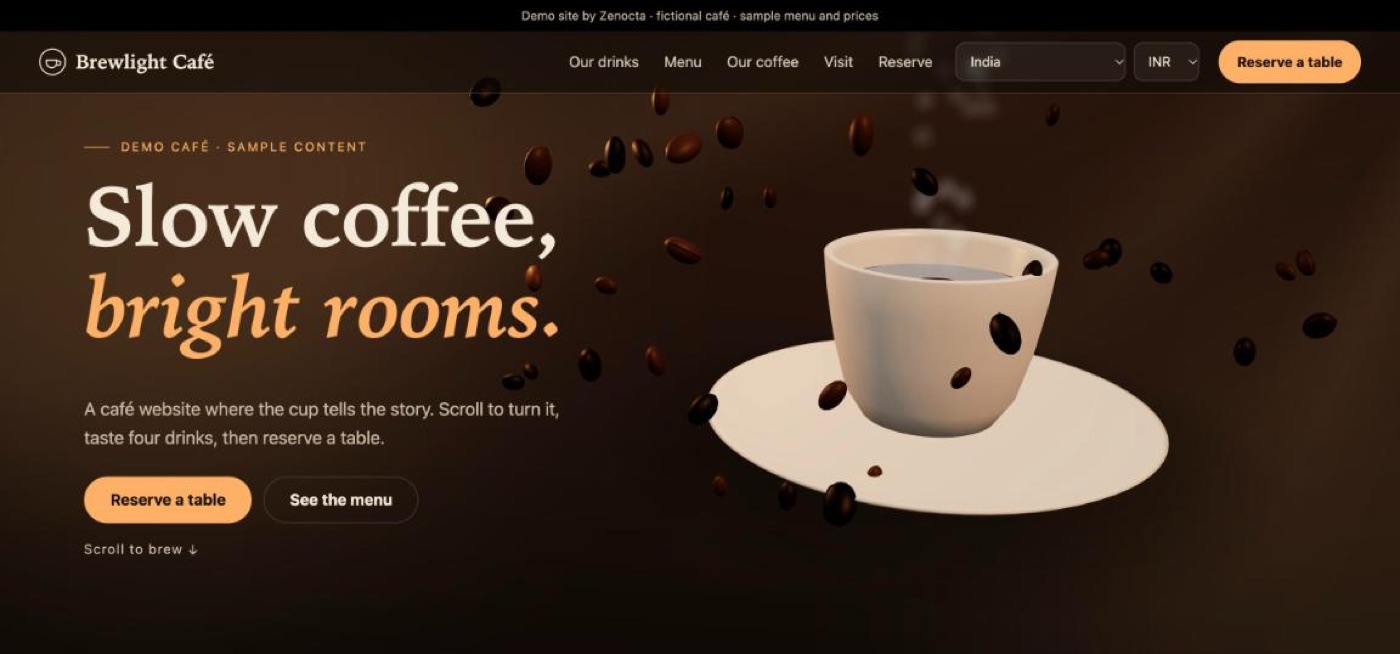
A scroll-driven café where the coffee cup turns as you scroll through four drinks, then lands on a reservation page. Its navigation shows how a small café can still organise a lot: a menu split into coffee, tea, bakes and seasonal items, a "Learn" area with a brew guide and workshops, a visit page with branches, and gift cards. It has a menu with a country and currency selector, and a 3D table that follows the booking form. Open the Brewlight Café demo.
Sipwave: a sparkling drink storefront
For a product brand rather than a venue. One 3D can changes flavour as you scroll, comes apart into layers, and then leads into a sample shop with a cart and a country and currency selector. Its menu includes flavours, bundles, stockists and wholesale, which is a useful pattern for any food or drink maker that sells to both shoppers and trade buyers. No orders are taken. Open the Sipwave demo.
Amberline Cay: an island resort
A fly-over of a procedural 3D island with villas, dining, a spa and a beach, available in day and night themes. It shows how a larger hospitality site stays navigable: pages grouped as Stay, Do, Discover and Plan, with rooms and villas, an island map, packages, dining, experiences, a guest FAQ and a getting-here page. Enquiries go through a sample form. Open the Amberline Cay demo.
Mandapa & Marigold: a wedding and events planner
A mandap built live from garlands, drapes and diyas, with colour palettes that recolour the whole celebration. It includes venue pages (garden lawn, palace courtyard, beach front, rooftop terrace), service pages for each event, and planning tools such as a seating planner and a budget estimator. It is a good model for any business where the customer wants to imagine the result before they enquire. Open the Mandapa & Marigold demo.
Dum & Ember: an Indian restaurant and cloud kitchen
A copper handi cracks its dough seal and opens into layers of rice, saffron and spice as you scroll. Each menu page has its own 3D dish, and the site includes table reservation, an order enquiry, catering packages and a catering quote form. Its menu and outlets are samples, and its allergen note is a sample disclaimer. Open the Dum & Ember demo.
You can browse all of them, along with demos for other sectors, on the demo websites page. A demo shows what is possible; your own site would be scoped around your menu, rooms and photography.
From idea to launch: how a hospitality site comes together
A focused site can be live in as little as 7 days. That is the quick end: a handful of pages, content ready, and quick feedback. More pages, more features such as a booking flow or a shop, integrations with other tools, and slow content all lengthen the schedule. The pricing page lists what moves the final price: pages, features, integrations and timeline, with websites starting from ₹8,888 in India and US$99 for international clients. Domain name and hosting are billed separately and stay in your name.
- Free consultation. Tell us what the place is, who visits it and what you want them to do: book, call, order or enquire.
- Scoped, fixed-price proposal. Within 24 hours you receive the pages, the timeline and one price in writing, and nothing starts until you approve it.
- Content handover. Menu text, photos, hours, policies and logo. This step sets the real launch date.
- Design and build. You see the layout early, while changes are cheap, then the full site on a real phone.
- Review and fixes. Check every price, hour and phone number. Send all feedback in one round where you can.
- Domain, hosting and launch. We help you set up both in your name, then go live.
- After launch. Update the menu and hours as they change, and add events or journal posts.
How to start
If you run a café, restaurant, hotel or event business and want a site built around your own menu and rooms, start with our website development page to see what we cover, check pricing for how a price is set, and then contact us for a free consultation. For a wider view of what a good site can contain, see our website development trends for 2026, and browse websites we have built.
Try it live
Open the real thing: demos run in a new tab with sample data, apps link to their own page.
 Live demoBrewlight Café demoScroll a 3D coffee cup through four drinks, browse the sample menu and try the reservation form.
 Live demoDum & Ember demoOpen a 3D biryani handi layer by layer, then see sample reservation and catering pages.
 Live demoAmberline Cay demoFly over a 3D island resort and browse rooms, dining and a sample enquiry form.
- ABrowse allAll demo websitesWorking demo sites for fictional businesses across ten sectors.
- PBrowse allPricingWebsites from ₹8,888, with a fixed-price proposal within 24 hours.
- TBrowse allTalk about your websiteBook a free consultation and get a scoped proposal.
Frequently asked questions
01What pages does a restaurant website need?
At minimum: a home page, a text-based menu with prices, a reservation or enquiry page, an about page, and a visit page with hours, map and phone. Add rooms, venues or catering pages if you sell those, and an FAQ for common questions.
02Should a restaurant menu be a PDF or a web page?
A web page. PDFs and menu photos are slow to open on phones, hard to read without zooming and cannot be found as easily by search. Text on the page can be resized, searched and updated quickly when prices change.
03Is a 3D website a good idea for a café or hotel?
It can be, when the 3D explains the place and the essentials stay fast. Keep hours, menu and reserve in plain text, test on a mid-range phone, and respect reduced-motion settings. Use 3D for mood, not as a barrier to booking.
04How long does it take to build a restaurant or hotel website?
A focused site can be live in as little as 7 days. Larger scope, such as booking flows, shops, integrations or slow-arriving photos and menu text, takes longer. The proposal states the timeline before you approve any work.
05Is hosting part of the website price?
No. Domain name and hosting are billed separately and stay in your name, and we help you set them up. Website development starts from ₹8,888 in India and US$99 for international clients, with the final price set by scope.