In this guide
A buyer at a plant, a procurement manager or a homeowner thinking about a rooftop is not looking for a clever site. They want to know whether you can make or install the thing they need, whether you are credible, and how to ask for a price. A good website for a manufacturer or a solar installer answers those three questions quickly, shows its capabilities without exaggeration and turns interest into a request that someone can act on.
These two sectors have fewer demo sites than most, so this guide spends its time where the work is: the page map, the enquiry and quote flows, and what you need to prepare.
What do visitors to a manufacturer or solar installer site come to do?
The audiences are different, but the pattern is the same: a specific need, a short list of suppliers and a quick judgement about who looks capable.
- Manufacturer's visitors are engineers, buyers and purchase managers. They want the product range, specifications, materials, tolerances, lead times and a way to request a quote. They often arrive from a search for a specific part type.
- Installer's visitors are homeowners, shop owners, housing societies and factory managers. They want to know if solar suits their roof, roughly what it involves and how to arrange a site visit.
- Both are looking for signs that you are real: a physical location, named people, finished work and honest wording.
What makes them leave: catalogues that are a single image, no way to ask for a quote without a phone call, vague claims such as "world class quality" with no detail, and pages that are slow on an office computer or a phone. For installers, an estimate that appears with no explanation of how it was worked out is a red flag for careful buyers.
A page and section map
Build the map from the visitor's journey: find the product or solution, check it is credible, ask for a price. Two maps follow, one for each kind of business.
For a manufacturer
| Page | Purpose | Key elements |
|---|---|---|
| Home | Say what you make and for whom | One clear line, the main product groups, industries served, a visible quote button |
| Product catalogue | Let buyers find a part quickly | Categories, a clean list with images, filters by type or material where the range is large |
| Product page | Provide what an engineer needs | Photo or drawing, description, materials, available sizes or ranges, downloads, an "add to quote" button |
| Capabilities | Show what you can actually do | Processes, materials, size ranges, volumes, in claims you can support |
| Quality and testing | Show how you check your work | The checks you really run; certificates only if you hold them, with how to verify |
| Industries served | Help buyers see themselves | The sectors you really supply, with a sentence on what they need |
| Downloads | Support the buying process | Catalogue, datasheets and drawing packs as real files |
| Request a quote | Convert | The RFQ form described below |
| About, team, contact, legal | Show you are real | Address, plant or office photographs, named contacts, privacy and terms |
For a solar installer
| Page | Purpose | Key elements |
|---|---|---|
| Home | Show what you do and invite a first step | Who you serve, how it works in a few steps, an estimator and a survey button |
| Solutions | Match different roofs and needs | One page each for home, apartment society, factory, farm, campus and so on, only where you really work |
| Packages | Answer "what is in it?" | What each package includes, what is an add-on, how a price is built; no subsidy wording unless you have checked it |
| Estimator | Give a first idea with honest assumptions | A small calculator that states how it is worked out and says it is not a quote |
| How it works | Reduce fear of the process | Survey, design, approval, installation, handover, in order |
| Projects | Provide proof | Real finished work, with permission, in plain facts |
| Care and warranty | Cover after-sale worries | Cleaning, monitoring and service, in your own wording |
| Book a survey | Convert | The survey form described below |
| About, team, FAQ, contact, legal | Show you are real | Office, people, honest answers, privacy and terms |
How to design the quote and survey flows
For these businesses the enquiry is the product of the website. A quote request that is too short wastes your team's time on follow-up calls. One that is too long never gets sent. The aim is to collect just enough that the first reply can be useful.
The RFQ for a manufacturer
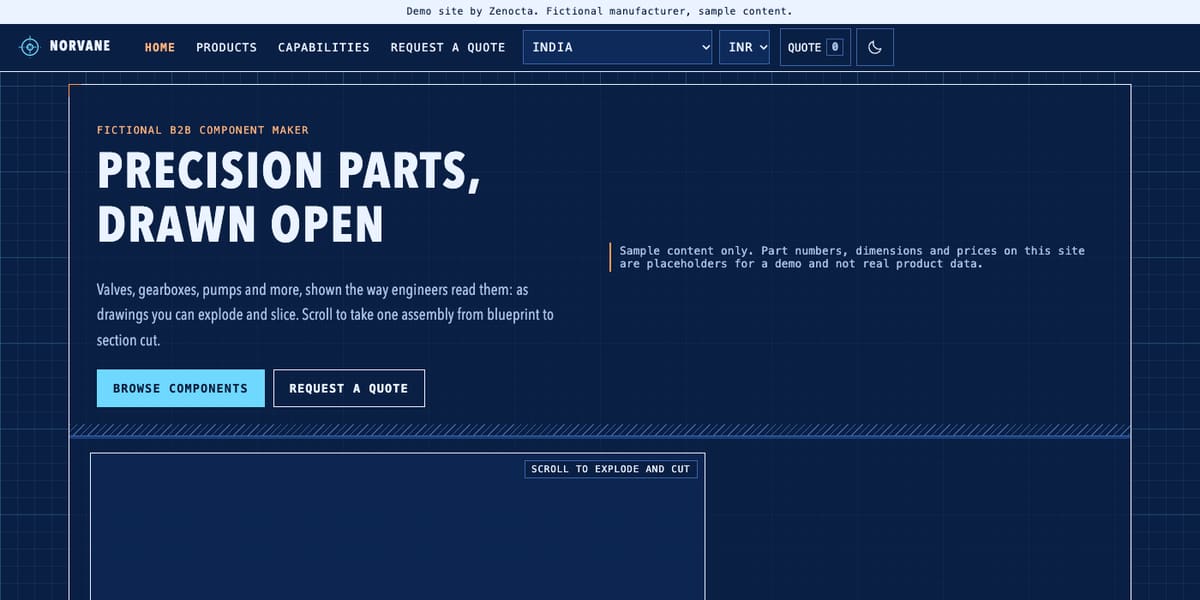
A good request-for-quote flow lets the buyer pick items from the catalogue, then fills in the rest once. The Norvane demo's quote page works this way: it keeps a quote list that fills as you add components and asks for company, contact name, email, phone, total quantity, a delivery timeframe and notes.
| Field | Why you need it | Tip |
|---|---|---|
| Items and quantities | The core of the request | Let people add from product pages so they do not retype part names |
| Company and contact | To reply to the right person | Ask for a business email and a phone number |
| Delivery timeframe | To tell urgent from exploratory | Use a short list of choices, not free text |
| Drawings or specifications | To quote custom work | Allow a file or a link, and say which formats you accept |
| Notes | For anything unusual | One open box, clearly optional |
| What happens next | To set expectations | State who replies and in what time you can keep |
The survey booking for an installer
For a solar installer, the equivalent is a site-survey request. Sunvale's demo breaks it into three short steps: the kind of roof, a rough monthly bill range and preferred survey time, then name and contact details. Splitting a form into steps keeps it light on a phone and lets the buyer see progress. Pick the questions that change your reply, such as roof type and approximate usage, and leave the rest for the survey itself.
Tip
Decide before design where every quote or survey request lands, who owns it and how fast it should be answered. Then show that promise next to the form. A site that collects requests nobody reads loses buyers faster than a site with no form at all.
Credibility without overclaiming
Industrial and energy buyers are cautious, and some will verify what you say. Claim only what you can show.
- Show capabilities as processes, materials and ranges you actually handle.
- List certifications and approvals only if you hold them, and say how a buyer can verify them.
- Use real photographs of your plant, team and finished installations, with permission.
- Avoid numbers you cannot back up: "the largest", "the fastest", counts of customers or projects without a record.
- For estimates and calculators, state the assumptions in plain words and say it is not a quote.
- Check current rules before mentioning any standard, regulation, incentive or scheme. If you are unsure, leave it out and ask your adviser.
Content to prepare before design starts
- For manufacturers: a product list with names, categories, materials, sizes and ranges, and the datasheets or drawings that go with them.
- For manufacturers: clear photographs of each product, whole and uncropped, plus photographs of the plant and team.
- For installers: the roof and customer types you serve, the packages you offer and what each includes.
- For installers: photographs of finished installations with the owner's permission, and a plain description of your survey-to-handover process.
- Logo as a vector file and brand colours.
- Address, phone, email, working hours and the regions you serve.
- The names and roles of the people buyers will deal with, with their approval.
- Your warranty, service and returns wording, written by you.
- Where quote and survey requests should go, who answers them and how fast.
- Draft privacy and terms text, reviewed by someone qualified.
How motion and 3D help or hurt in industry and energy
Both sectors have a genuine reason to use 3D: it can show things a flat page cannot. A part pulled apart in an exploded view or cut through in a section shows how it is built. A moving sun across a roof shows why shade and tilt matter. Used this way, motion is explanation.
The risks are performance and distraction. Buyers often work on older office computers, shop-floor screens or phones on a mobile network. A heavy 3D scene that delays the product list costs enquiries. Keep specifications, tables and downloads as plain, fast, readable content. Never put a number buyers will rely on, such as a dimension or a price, inside something that animates. Respect the reduced-motion setting, and make sure the page is fully usable without the 3D.
Mobile first, and found by the right people
Mobile
Plant managers and homeowners both check on phones. Keep tap-to-call prominent, make the quote list and forms easy to complete on a small screen, use 44 pixel tap targets and 16 pixel inputs, and make tables of specifications scroll sideways inside their own container rather than breaking the layout. Test the quote or survey flow end to end on a real phone.
Search visibility basics
Put the product or solution name in the page title and the main heading. Use the words buyers use, such as the part type or the roof type. List your city or service area consistently. Provide datasheets as proper text files, not images of text. Keep pages fast. None of this promises a ranking; it simply makes your site easy to understand. For background, see corporate website vs landing page and why every business needs a modern website.
The industry and energy demos
There are two working demo websites in this sector. Both are fictional businesses with sample content: part numbers, dimensions, prices, tariffs and savings are placeholders, no certification or subsidy is claimed, and the forms send nothing.
Norvane Components: an industrial components maker
A 3D engineering drawing that you explode and slice, from blueprint to section cut. It has a catalogue of six sample components, pages for capabilities, materials, tolerance and fit, quality and testing, a custom part wizard, a downloads page that lists placeholder datasheets, and a quote basket feeding a request form. The quality page states plainly that it holds no certificate or accreditation. Open the Norvane Components demo.
Sunvale Energy: a rooftop solar installer
A live sun crosses a 3D roof with real shadows and a time and season slider, with energy flowing between panels, battery and home. It has solution pages for different roofs, a savings estimator that fills the roof with panels and spells out its assumptions, three sample packages with add-ons, a three-step survey booking form and pages on how it works and care. Open the Sunvale Energy demo.
From idea to launch: a realistic path
A focused site with a catalogue or a few solutions and one quote or survey flow can go live in as little as 7 days. Scope moves the timeline: the number of products or solutions, tools such as an estimator or custom wizard, 3D features, and above all how quickly your photographs, datasheets and wording arrive. The proposal states the timeline before you approve anything.
- Free consultation. Describe what you make or install, who buys it and how requests reach you today.
- Fixed-price proposal. Scope, timeline and one price in writing within 24 hours of the consultation.
- Prepare content. Send product data, photographs and wording from the checklist; we flag gaps.
- Design and build. Catalogue or solution pages, plus the quote or survey flow, built mobile first.
- Test the request route. Send a test quote or survey request and confirm it reaches the right person.
- Launch. Go live and hand over. Domain and hosting are billed separately.
How to start
Read about Zenocta as a website development company, check how pricing works (builds start from ₹8,888 in India and US$99 internationally, depending on pages, features and integrations) and talk to us about your business. You can also look through all the demo websites.
Try it live
Open the real thing: demos run in a new tab with sample data, apps link to their own page.
 Live demoNorvane Components demoA fictional components maker: an explodable 3D drawing, a catalogue and a quote basket.
 Live demoSunvale Energy demoA fictional solar installer: a live sun on a 3D roof, a savings estimator and packages.
- ABrowse allAll demo websitesBrowse all 48 demo websites by sector.
- WBrowse allWebsite pricingWhat a Zenocta website build covers and how pricing works.
- TBrowse allTalk about your websiteDescribe your business and get a scoped, fixed-price proposal.
Frequently asked questions
01What pages does a manufacturer's website need?
A home page, a product catalogue with a page per product, capabilities, quality and testing, industries served, downloads, a request-for-quote page, and about, contact and legal pages. Add a journal only if you will keep it updated.
02How should a request-for-quote form work?
Let buyers add items from product pages, then ask once for company, contact, quantity, delivery timeframe and notes, with an option to attach drawings. State who replies and how fast, and route every request to a named person.
03What should a solar installer's website include?
Solution pages for the roofs you serve, packages that say what is included, an estimator that states its assumptions and says it is not a quote, a clear process, finished projects shown with permission, and a simple survey booking form.
04Can I mention certifications or subsidies on my website?
Only certifications you hold, with a way to verify them. Rules on standards, incentives and schemes change, so check the current rules with an adviser before publishing any such claim, and leave it out if you are unsure.
05Is 3D useful on an industrial or energy website?
Yes, when it explains something, such as how a part is assembled or how shadows move over a roof. Keep specifications and prices as plain, fast content, respect reduced-motion settings and make sure the site works without the 3D.